
Exploring ASA Theorem
Loading the math board and drawing, please wait…
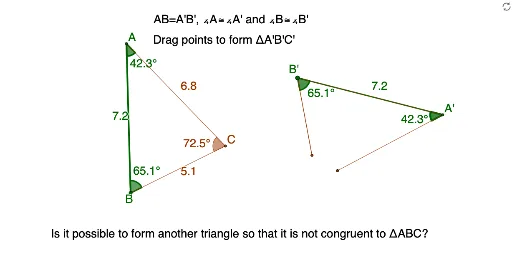
This example demonstrates the geometric construction of a triangle using the ASA condition. Core math concepts include triangle construction, angle measurement, and side length calculation. It utilizes GeoGebra commands and objects like Polygon, Circle, Point, Segment, Intersect, Ray, Angle, Distance. Suitable for middle school and above students to understand geometric constructions and the application of the ASA theorem.
GeoGebra Commands & Parameters
Polygon(A, B, C) → poly1, c, a, bCircle(A', Segment[B, A]) → dPoint(d) → B'Segment(A', B') → ePoint(c) → DPoint(b) → ECircle(A', Segment[E, A]) → fCircle(A', Segment[D, A]) → gIntersect(g, e, 1) → FCircle(F, Segment[E, D]) → hIntersect(f, h, 1) → GRay(A', G) → iPoint(i) → C'_2Segment(A', C'_2) → jPoint(a) → IPoint(c) → JCircle(B', Segment[I, B]) → kCircle(B', Segment[J, B]) → pIntersect(p, e, 1) → KCircle(K, Segment[I, J]) → qIntersect(k, q, 2) → LRay(B', L) → lPoint(l) → C'_1Segment(C'_1, B') → mIntersect(j, m) → C'Angle(B, A, C) → αAngle(A, C, B) → βAngle(C, B, A) → γAngle(A', C', B') → εDistance(c, b) → nDistance(B', A') → distanceB'A'Distance(A', C') → distanceA'C'Distance(C', B') → distanceC'B'Angle(C'_1, B', A') → δAngle(B', A', C'_2) → ζPolygon(A', B', C') → poly2, c', a', b'
AI Drawing Prompt Reference
Draw a triangle and construct a congruent copy of it based on one side. Start with the original triangle, marking its vertices and sides. Then, using one vertex as a reference, replicate the adjacent two sides and the included angle to form a second triangle satisfying the ASA congruence condition. Next, pick points on the corresponding sides of the second triangle, use circles and rays to locate the third vertex, and connect to form the new triangle. Finally, label the equal corresponding angles and sides, and display side lengths and angle measures.
The prompt above was compiled from the original drawing commands and is for reference only.