
Tetrahedra Rolling on an Icosahedron
Loading the math board and drawing, please wait…
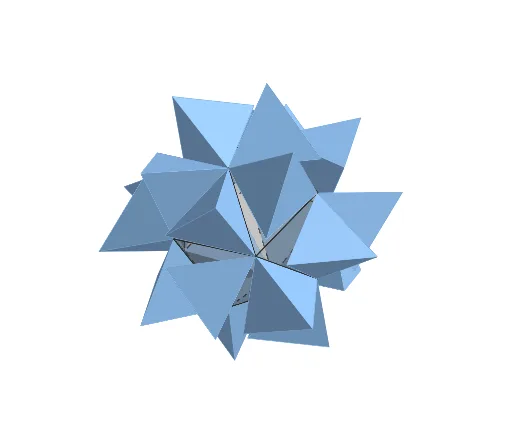
This example demonstrates multiple regular tetrahedra rolling continuously over the surface of a regular icosahedron, visualizing the contact and rotational motion between polyhedra in 3D space. The core mathematical concepts involve solid geometry properties of Platonic solids, spatial rotations, and geometric transformations, with a parameter t controlling the continuous motion. Construction highlights include using GeoGebra commands such as Icosahedron and Tetrahedron to build the solids, Rotate for rotation, Midpoint and Angle to determine axes and angles, plus a slider t and button1 to animate. Suitable for high school and above students or math enthusiasts exploring symmetry and spatial motion of regular polyhedra, and useful as a dynamic demonstration in solid geometry teaching.
GeoGebra Commands & Parameters
Midpoint(I_{12}, I_{11}) → NAngle(K_{12}, N, K_{11}) → αIcosahedron(K_{14}, I_{14}, I_{13}) → I, A, face1, face3, face10, face9, face6, face7, face8, face2, face4, face5, B, faceBEH, faceBFH, faceFHJ, faceCFJ, faceEGH, faceGHJ, faceDGJ, faceCDJ, faceAEG, faceADG, C, edge2, edge6, edge1, edge11, edge4, edge12, edgeCD, edge10, edgeAD, edge7, D, edge9, edgeAE, edge8, edgeBE, edge3, edge5, edgeBF, edgeCF, edgeBH, edgeEH, E, edgeFH, edgeFJ, edgeHJ, edgeCJ, edgeGH, edgeEG, edgeGJ, edgeDJ, edgeDG, edgeAG, F, G, H, JTetrahedron(K_{11}, I_{11}, I_{12}) → T_1, K, edge17, edge15, face11, face14, face13, face12, edge16, edge14, edge13, edge18Tetrahedron(K_{12}, I_{11}, J_{12}) → S_1, L, edge23, edge21, face15, face18, face17, face16, edge22, edge20, edge19, edge24Tetrahedron(K_{12}, J_{12}, K_{14}) → S_2, M, edge27, edge29, face19, face21, face22, face20, edge26, edge28, edge25, edge30Angle(K, N, K_{11}) → βRotate(T_1, (-t), edgeGJ) → T_1'Rotate(T_1', (2 * π / 5), Line[I_{12}, O]) → N1Rotate(T_1', ((2 * π / 5) * 2), Line[I_{12}, O]) → N2Rotate(T_1', ((2 * π / 5) * 3), Line[I_{12}, O]) → N3Rotate(T_1', ((2 * π / 5) * 4), Line[I_{12}, O]) → N4Rotate(Mirror[T_1', O], (2 * π / 5), Line[I_{13}, O]) → T_2'Rotate(T_2', (2 * π / 5), Line[I_{13}, O]) → O1Rotate(T_2', ((2 * π / 5) * 2), Line[I_{13}, O]) → O2Rotate(T_2', ((2 * π / 5) * 3), Line[I_{13}, O]) → O3Rotate(T_2', ((2 * π / 5) * 4), Line[I_{13}, O]) → O4Rotate(S_1, t, edgeCD) → S_1'Rotate(S_2, (-t), edge12) → S_2'Rotate(S_1', (2 * π / 5), Line[I_{13}, O]) → P1Rotate(S_1', ((2 * π / 5) * 2), Line[I_{13}, O]) → P2Rotate(S_1', ((2 * π / 5) * 3), Line[I_{13}, O]) → P3Rotate(S_1', ((2 * π / 5) * 4), Line[I_{13}, O]) → P4Rotate(S_2', (2 * π / 5), Line[I_{13}, O]) → Q1Rotate(S_2', ((2 * π / 5) * 2), Line[I_{13}, O]) → Q2Rotate(S_2', ((2 * π / 5) * 3), Line[I_{13}, O]) → Q3Rotate(S_2', ((2 * π / 5) * 4), Line[I_{13}, O]) → Q4
AI Drawing Prompt Reference
Create a 3D scene with a regular icosahedron and several congruent regular tetrahedra rolling on its surface. First construct the icosahedron with its key vertices, faces, and edges. Then build three tetrahedra (T1, S1, and S2) using specific icosahedron vertices and edge-related positions, ensuring they touch chosen faces/edges of the icosahedron. Determine the needed rotation angle(s) from the geometry (using the angle between relevant points/lines). Add a parameter t and animate the motion: rotate T1 continuously about the edge it contacts by an amount depending on t. Rotate S1 and S2 by opposite signs about their corresponding edges so the rolling contact is maintained. Finally, generate additional tetrahedra by rotating the intermediate configurations around an icosahedron axis (using steps of 2π/5) to obtain symmetric positions such as T2, P1–P4, and Q1–Q4, producing a continuous rolling visualization.
The prompt above was compiled from the original drawing commands and is for reference only.