
Tesseract Rotation Demonstration
Loading the math board and drawing, please wait…
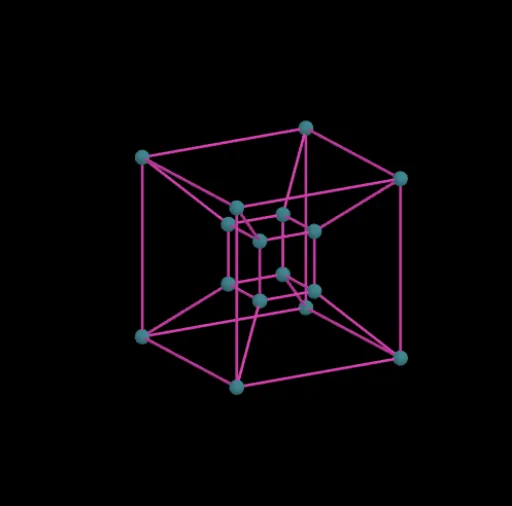
This example visually demonstrates the rotation of a four-dimensional hypercube (Tesseract) in 4D space by dynamically rotating its faces. Core mathematical concepts include rotation, angles, vectors, matrix transformations, solid geometry, and parametric equations. Construction highlights involve Geogebra commands/objects like Segment (line segment), angleYZ, angleXZ, angleXW, angleZW, angleXY, angleYW, distance (distance), button1 (button), points P0 to P15, and rotation transformations rotXY, rotYZ, rotXZ, rotXW, rotYW, rotZW. Suitable for high school students and math enthusiasts studying advanced geometry and linear algebra concepts.
GeoGebra Commands & Parameters
Segment(A0, A1) → B0Segment(A1, A2) → B1Segment(A2, A3) → B2Segment(A3, A0) → B3Segment(A4, A5) → C0Segment(A5, A6) → C1Segment(A6, A7) → C2Segment(A7, A4) → C3Segment(A0, A4) → D0Segment(A1, A5) → D1Segment(A2, A6) → D2Segment(A3, A7) → D3Segment(A8, A9) → E0Segment(A9, A10) → E1Segment(A10, A11) → E2Segment(A11, A8) → E3Segment(A12, A13) → F0Segment(A13, A14) → F1Segment(A14, A15) → F2Segment(A15, A12) → F3Segment(A8, A12) → G0Segment(A9, A13) → G1Segment(A10, A14) → G2Segment(A11, A15) → G3Segment(A0, A8) → H0Segment(A1, A9) → H1Segment(A2, A10) → H2Segment(A3, A11) → H3Segment(A4, A12) → H4Segment(A5, A13) → H5Segment(A6, A14) → H6Segment(A7, A15) → H7