
Tangram Side Length Relationships via Geometric Construction
Loading the math board and drawing, please wait…
In collections
Tangram & Maths
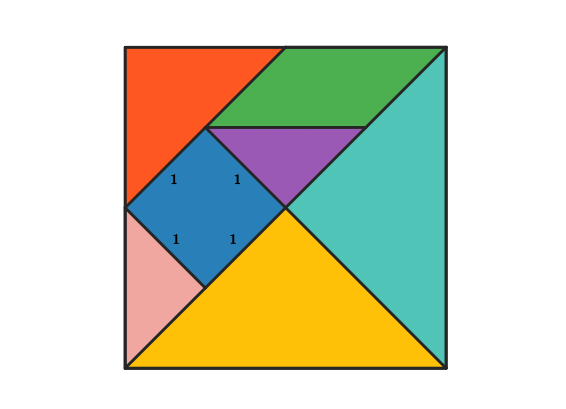
This example explores how the side lengths of Tangram pieces relate to each other when the pieces fit into the same overall figure. It highlights geometric constraints among the segments using the properties of right triangles and isosceles triangles, together with parallelogram-related relationships, and it leverages the Pythagorean theorem to explain length relations coming from right-angle structures. The construction uses standard Euclidean geometry tools: Polygon and Segment to build the Tangram outlines and boundary edges; Midpoint to introduce symmetry or splitting points needed for consistent measurements; Line and Intersect to compute key joining points between adjacent pieces; and Rotate to generate rotated copies of pieces while preserving the required alignment. The interactive layout (with many named points/segments and multiple Tangram polygons such as poli1–poli4, plus supporting frames) is designed for students to verify side-length ratios visually and to connect the measured geometry with theoretical results. Suitable for secondary-school geometry learning and hands-on classroom or self-study activities.
GeoGebra Commands & Parameters
Polygon(A, B, 4) → poli1, frame3, frame4, frame1, frame2, C, DSegment(A, C) → frame12Midpoint(D, C) → EMidpoint(D, A) → FSegment(F, E) → frame5Midpoint(A, C) → GSegment(B, G) → frame9Midpoint(F, E) → HMidpoint(G, C) → ISegment(H, I) → frame7Segment(G, H) → frame8Line(F, frame8) → jIntersect(j, frame12) → JSegment(F, J) → frame11Polygon(A, G, B) → poli2, b_1, a_1, g_1Rotate(O + (a_1, 0), Angle[B - G] + Angle[O - N] - Angle[G - A], O) → PPolygon(N, O, P) → poli4, p, n, oPolygon(B, G, C) → poli3, c_1, b_2, g_2Rotate(L + (b_2, 0), Angle[C - G] + Angle[L - K] - Angle[G - B], L) → MPolygon(K, L, M) → poli5, m, k_1, lPolygon(H, E, C, I) → poli6, h_1, e_1, c_2, i_1Rotate(R + (e_1, 0), Angle[C - E] + Angle[R - Q] - Angle[E - H], R) → SRotate(S + (c_2, 0), Angle[I - C] + Angle[S - R] - Angle[C - E], S) → TPolygon(Q, R, S, T) → poli7, q, r, s, tPolygon(H, G, I) → poli8, i_2, h_2, g_3Rotate(V + (h_2, 0), Angle[I - G] + Angle[V - U] - Angle[G - H], V) → WPolygon(U, V, W) → poli9, w, u, vPolygon(F, H, G, J) → poli10, f_1, h_3, g_4, j_1Rotate(A_1 + (h_3, 0), Angle[G - H] + Angle[A_1 - Z] - Angle[H - F], A_1) → B_1Rotate(B_1 + (g_4, 0), Angle[J - G] + Angle[B_1 - A_1] - Angle[G - H], B_1) → C_1Polygon(Z, A_1, B_1, C_1) → poli11, z, a_2, b_3, c_3Polygon(F, J, A) → poli12, a_3, f_2, j_2Rotate(E_1 + (f_2, 0), Angle[A - J] + Angle[E_1 - D_1] - Angle[J - F], E_1) → F_1Polygon(D_1, E_1, F_1) → poli13, f_3, d_1, e_2Polygon(F, D, E) → poli14, e_3, f_4, d_2Rotate(H_1 + (f_4, 0), Angle[E - D] + Angle[H_1 - G_1] - Angle[D - F], H_1) → I_1Polygon(G_1, H_1, I_1) → poli15, i_3, g_5, h_4
AI Drawing Prompt Reference
On a single plane, first draw a polygonal main outline from four given vertices. Connect a pair of vertices to form a key segment, then compute midpoints of two other vertex pairs to obtain symmetry-splitting points. Use segments between these midpoints and the endpoints, find an important intersection of a constructed line with the key segment, and use the resulting points to define additional supporting edges. Build a second triangular face from three of the original vertices. Then create several adjacent faces by rotating the constructed triangles or polygons about specified centers with carefully matched directions, producing multiple aligned pieces. Finally, assemble some larger regions by grouping the resulting polygons into combined quadrilaterals and triangles so the tiling and side/angle relationships are clearly visible.
The prompt above was compiled from the original drawing commands and is for reference only.