
Tangram Puzzle - Rectangle
Loading the math board and drawing, please wait…
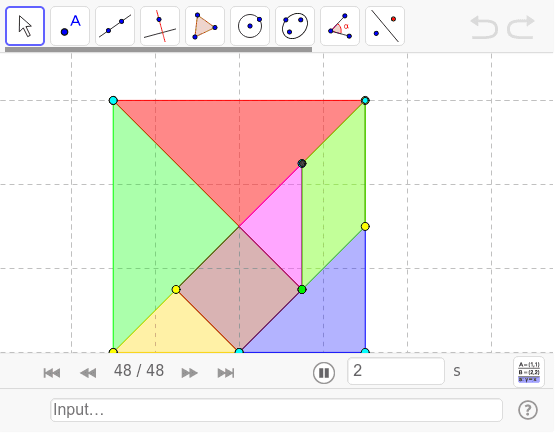
This example demonstrates how to rearrange the seven pieces of a tangram from a square into a rectangle. Key mathematical concepts include geometric transformations and area calculation. Using GeoGebra commands such as Point, Polygon, Segment, etc., the process of tangram assembly is dynamically illustrated. Suitable for high-grade elementary and junior high school students to learn geometric transformations and area calculation.
GeoGebra Commands & Parameters
Point(Circle[A, 6]) → BPolygon(A, B, C) → poly1, c, a_1, bPoint(Circle[A_1, 6]) → B_1Polygon(A_1, B_1, C_1) → poly1_1, c_1, a_2, b_1Point(Circle[D, 3]) → EPolygon(D, E, F) → poly2, f, d, ePoint(Circle[G, a / 2]) → HSegment(G, H) → gSemicircle(G, H) → hLineBisector(g) → iIntersect(h, i) → I,Polygon(G, H, I) → poly3, i_1, g_1, h_1Point(Circle[G_1, a / 2]) → H_1Segment(G_1, H_1) → g_3Semicircle(G_1, H_1) → h_3LineBisector(g_3) → i_3Intersect(h_3, i_3) → I_1,Polygon(G_1, H_1, I_1) → poly3_1, i_2, g_2, h_2Point(Circle[J, a / 2]) → KSegment(J, K) → jMidpoint(j) → LCircle(L, J) → kOrthogonalLine(L, j) → lIntersect(k, l) → M, NPolygon(J, M, K, N) → poly4, j_1, m, k_1, nPoint(Circle[O, a / 2]) → PSegment(O, P) → pRotate(O, -45*°, P) → O'Angle(O', P, O) → αRotate(P, 135*°, O) → P'Angle(P, O, P') → βRay(P, O') → qRay(O, P') → rCircle(O, (a * sqrt(2) / 4)) → sIntersect(s, r) → Q,Intersect(s, q) → R, SPolygon(O, P, R, Q) → poly5, o, p_1, r_1, q_1
AI Drawing Prompt Reference
Draw a tangram puzzle showing the rearrangement from a square to a rectangle. Start with a large right triangle, then a smaller similar triangle, followed by a medium triangle. Next, construct a triangle using a semicircle and a perpendicular bisector, then another similar triangle. After that, form a square using a circle and a perpendicular line through its midpoint. Finally, create a quadrilateral using rays and a circle intersection. Arrange all pieces to maintain equal area, demonstrating geometric transformations and area calculation.
The prompt above was compiled from the original drawing commands and is for reference only.