
Tangram Puzzle Cat (Rotations and Translations)
Loading the math board and drawing, please wait…
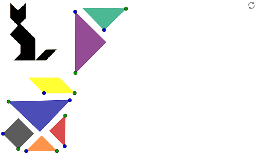
This example demonstrates how to recreate a cat picture using Tangram pieces, focusing on geometric transformations such as rotations and translations. Key math concepts include transformations, geometry, and spatial reasoning. GeoGebra commands like Point, Segment, Semicircle, Midpoint, OrthogonalLine, Intersect, Polygon, Circle, Rotate, Angle, Ray, and Line are used to construct the shapes. Suitable for middle school students learning geometric transformations and spatial visualization.
GeoGebra Commands & Parameters
Point(Circle[C, a]) → DSegment(C, D) → bSemicircle(C, D) → cMidpoint(b) → EOrthogonalLine(E, b) → dIntersect(c, d, 1) → FPolygon(D, F, C) → poly1, c_1, d_1, fPoint(Circle[G, a]) → HSegment(G, H) → eSemicircle(G, H) → gMidpoint(e) → IOrthogonalLine(I, e) → hIntersect(g, h, 1) → JPolygon(G, H, J) → poly2, j, g_1, h_1Point(Circle[A, a / 2]) → BSegment(A, B) → iOrthogonalLine(A, i) → kCircle(A, B) → pIntersect(p, k, 2) → KPolygon(A, B, K) → poly3, k_1, a_1, b_1Point(Circle[L, a / 2]) → MSegment(L, M) → lSemicircle(L, M) → qMidpoint(l) → NOrthogonalLine(N, l) → mIntersect(q, m, 1) → OPolygon(L, M, O) → poly4, o, l_1, m_1Point(Circle[P, a / 2]) → QSegment(P, Q) → nSemicircle(P, Q) → rMidpoint(n) → ROrthogonalLine(R, n) → sIntersect(r, s, 1) → SPolygon(P, Q, S) → poly5, s_1, p_1, q_1Point(Circle[T, (a * sqrt(2) / 4)]) → USegment(T, U) → tOrthogonalLine(T, t) → e_1OrthogonalLine(U, t) → f_1Circle(T, U) → r_1Circle(U, T) → t_1Intersect(t_1, f_1, 2) → VIntersect(r_1, e_1, 2) → WPolygon(T, U, V, W) → poly6, t_2, u, v, wPoint(Circle[Z, a / 2]) → A_1Segment(Z, A_1) → i_1Rotate(Z, 315°, A_1) → Z'Angle(Z', A_1, Z) → αRay(A_1, Z') → j_1Circle(A_1, (a * sqrt(2) / 4)) → c_2Intersect(c_2, j_1, 1) → B_1Line(Z, j_1) → n_1Line(B_1, i_1) → a_2Intersect(n_1, a_2) → C_1Polygon(A_1, B_1, C_1, Z) → poly7, a_3, b_2, c_3, zPoint(Circle[D_1, a]) → E_1