
Tangram in Cartesian Plane
Loading the math board and drawing, please wait…
In collections
MateTangram
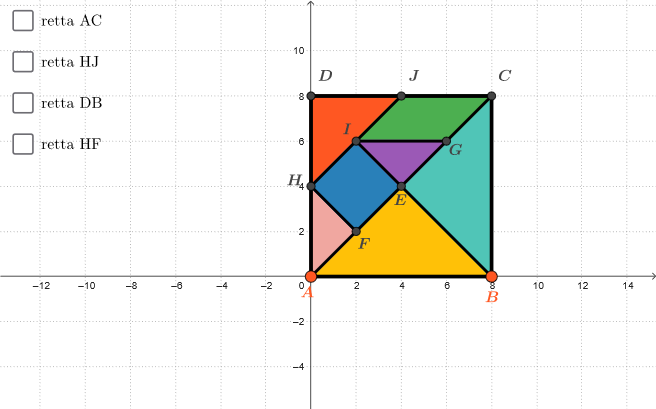
This example explores the equations and relative positions of lines using a tangram in the Cartesian plane. By constructing polygons, segments, midpoints, and lines, students can intuitively understand key concepts in coordinate geometry. Suitable for middle school and above students to learn about geometric transformations and linear equations.
GeoGebra Commands & Parameters
Polygon(A, B, 4) → poly1, f, g, h, i, C, DSegment(A, C) → jMidpoint(j) → EMidpoint(h) → JMidpoint(i) → HSegment(H, J) → kMidpoint(k) → ISegment(I, B) → lMidpoint(E, C) → GMidpoint(E, A) → FSegment(I, G) → mSegment(H, F) → nLine(A, C) → rettaACPolygon({A, B, E}) → t1Polygon({B, E, C}) → t2Polygon({D, J, H}) → t3Polygon({H, F, A}) → t4Polygon({H, F, E, I}) → q1Polygon({I, G, C, J}) → q2Polygon({I, G, E}) → t5Line(H, J) → rettaHJLine(B, D) → rettaBDLine(H, F) → rettaHF
AI Drawing Prompt Reference
Draw a tangram in the Cartesian plane, including multiple polygons, segments, and lines. Start by constructing a quadrilateral, then find the midpoints of relevant segments and connect them to form new segments. Next, use these segments and points to draw several triangles and quadrilaterals, creating the individual pieces of the tangram. Finally, add a few straight lines connecting key points to complete the figure.
The prompt above was compiled from the original drawing commands and is for reference only.