
Tangram in a Coordinate System: Line Equations and Relative Position
Loading the math board and drawing, please wait…
In collections
Tangram & Maths
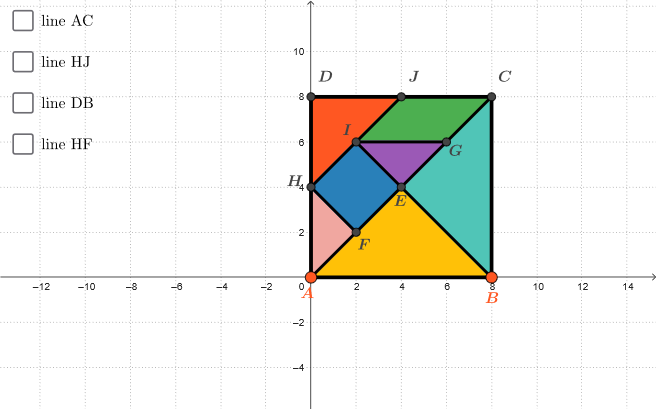
This example places a tangram inside a coordinate grid and uses multiple line equations to investigate how the tangram’s parts relate to straight lines and how those lines sit relative to one another in the plane. It highlights the interaction between a geometric shape (tangram polygons) and analytic descriptions (straight lines). Key math topics include coordinate geometry, line construction from point pairs, geometric position/relative placement, and the role of midpoints in building constraints that shape the configuration. Construction uses GeoGebra commands shown in the summary: Polygon to form tangram regions and boundaries, Segment to define edges between key points, Midpoint to create pivotal points for symmetry or partitioning, and Line to generate the straight-line objects determined by selected point pairs. The resulting objects (tangram polygon pieces and the connecting lines) allow learners to visually connect equations of lines with the tangram’s layout. Suitable for middle school through early university students for lessons on analytic geometry, geometric construction, and graph-based reasoning.
GeoGebra Commands & Parameters
Polygon(A, B, 4) → poly1, f, g, h, i, C, DSegment(A, C) → jMidpoint(j) → EMidpoint(h) → JMidpoint(i) → HSegment(H, J) → kMidpoint(k) → ISegment(I, B) → lMidpoint(E, C) → GMidpoint(E, A) → FSegment(I, G) → mSegment(H, F) → nLine(A, C) → rettaACPolygon({A, B, E}) → t1Polygon({B, E, C}) → t2Polygon({D, J, H}) → t3Polygon({H, F, A}) → t4Polygon({H, F, E, I}) → q1Polygon({I, G, C, J}) → q2Polygon({I, G, E}) → t5Line(H, J) → rettaHJLine(B, D) → rettaBDLine(H, F) → rettaHF
AI Drawing Prompt Reference
On a coordinate grid, draw a tangram-like polygon configuration. First establish an outer quadrilateral and use key vertices to form the boundaries of the tangram pieces. Create crucial interior points as midpoints of selected connecting segments, then link these midpoint-related points with segments to determine the internal structure. Add several straight lines defined by chosen point pairs so you can visually compare where these lines sit relative to one another in the plane and how they pass alongside the tangram edges. Display both the tangram polygon regions and the corresponding lines generated from the relevant point pairs.
The prompt above was compiled from the original drawing commands and is for reference only.