
Tangent Vectors to a Parametrized Surface
Loading the math board and drawing, please wait…
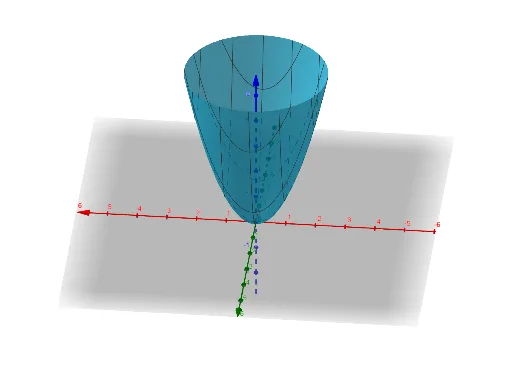
This example demonstrates how to construct tangent vectors on a surface defined by parametric equations. Key mathematical concepts include vectors and parametric equations. Using GeoGebra commands Vector and Surface, the construction of tangent vectors on the surface is illustrated. Suitable for high school and above students learning about parametric surfaces.
GeoGebra Commands & Parameters
Vector((1, 1, 2), (1 + cos(b), 1 + sin(b), 2 + (2 * cos(b)) + (2 * sin(b)))) → uVector(P, (2, 1, 4)) → vVector(P, (1, 2, 4)) → wVector(Q, (d, 1 + f, d^(2) + f^(2) + (2 * f))) → v2Vector(Q, (d + 1, f, d^(2) + f^(2) + (2 * d))) → v1Surface(d + s, f + t, d^(2) + f^(2) + ((2 * s) * d) + ((2 * t) * f), s, -20, 20, t, -20, 20) → e
AI Drawing Prompt Reference
On a surface defined by parametric equations, draw two tangent vectors and three position vectors to illustrate their relationships. Start by drawing two tangent vectors from a point on the surface, pointing in the directions of parameter changes. Then, draw three position vectors from the same point, pointing in different directions. Finally, draw the parametric surface to clearly display all vectors on it.
The prompt above was compiled from the original drawing commands and is for reference only.