
Tangent Function Geometric Construction and Limit Demonstration
Loading the math board and drawing, please wait…
In collections
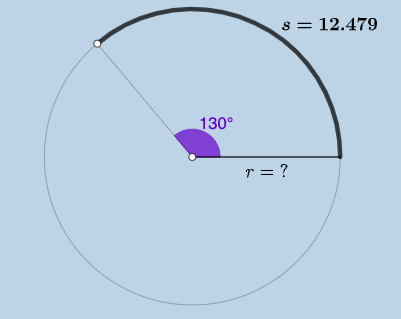
Arc Length & Sector Area EXPLORATION
This GeoGebra example demonstrates the geometric construction and limit behavior of the tangent function. It explores how the tangent function's graph transforms under geometric dilation and parameter changes, illustrating the connection between trigonometric functions and geometric figures such as trapezoids and sectors. The construction uses fundamental GeoGebra commands including Point, Ray, Circle, Segment, Rotate, Angle, CircleArc, CircleSector, Area, and Circumference, along with numerous points, angles, and area calculations to model the function's geometric properties. It is suitable for high school function modules and introductory calculus courses, helping students visualize the geometric meaning of tangent functions and limit concepts.
GeoGebra Commands & Parameters
Point(yAxis) → ARay(A, (1, 0)) → hPoint(h) → BCircle(A, B) → cSegment(A, B) → fRotate(B, (a * pi / 180), A) → B'Angle(B, A, B') → αCircleArc(A, B, B') → dSegment(A, B') → gCircleSector(A, B, B') → eTextfield(a) → InputBox1Area(c) → lCircumference(c) → mTextfield(n) → InputBox2FractionText(a / 360) → text8
AI Drawing Prompt Reference
Draw the geometric construction and limit behavior of the tangent function. Start by taking point A on the y-axis and drawing a ray h parallel to the x-axis through A, then taking point B on h. Construct a circle c with A and B as endpoints, and draw line segment f between A and B. Rotate point B' around A by angle a (in degrees), calculate the angle α between B, A, and B', and construct circular arc d using A, B, and B'. Draw line segment g between A and B', and construct circular sector e using A, B, and B'. Input angle parameter a, calculate the area l and circumference m of circle c, and display the text of a/360.
The prompt above was compiled from the original drawing commands and is for reference only.