
Symmetry of 32 Points on a Rose Curve
Loading the math board and drawing, please wait…
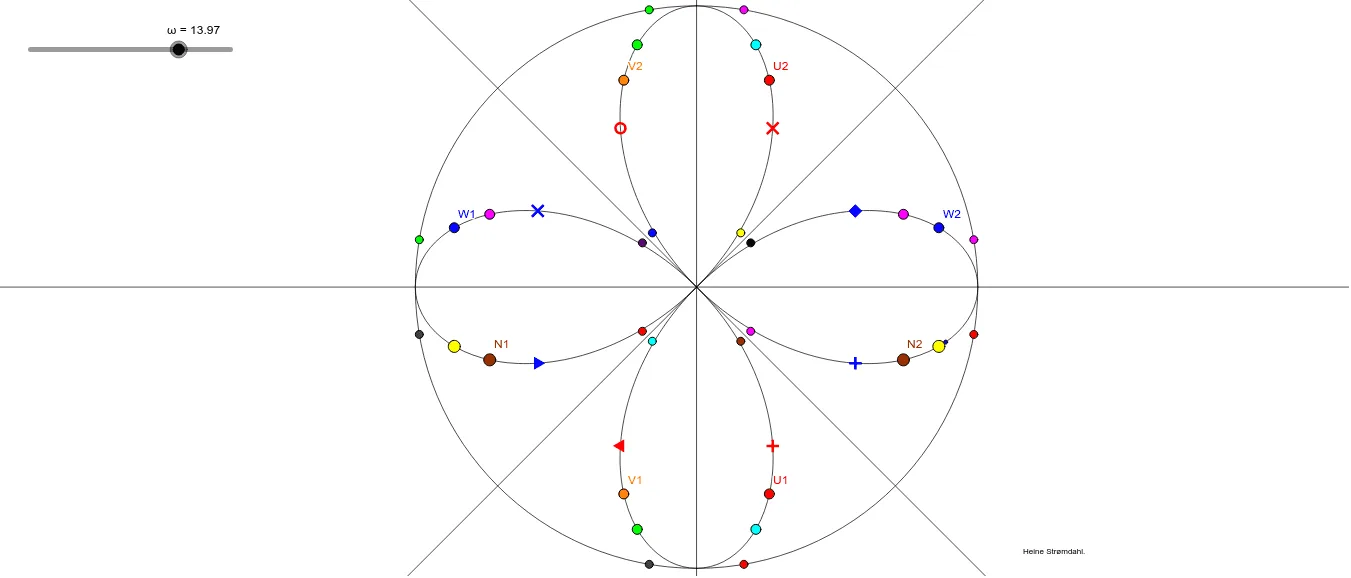
This example demonstrates the symmetry of 32 points on a rose curve, visualized with a circle. It involves core mathematical concepts like symmetry, parametric equations, trigonometric functions, and coordinate geometry. The construction uses GeoGebra commands such as Circle, CurveCartesian, and Mirror. Suitable for high school and above, helping learners understand parametric curves, trigonometric graphs, and symmetry.
GeoGebra Commands & Parameters
Circle(A, 0.1) → cCurveCartesian(((3 * cos((2 * ω))), ((3 * cos((2 * ω))) * sin((2 * ω)))), ω, 0, (2 * π)) → aCurveCartesian((((3 * cos((2 * ω))) * sin(ω)), ((3 * cos(ω)) * cos((2 * ω)))), ω, 0, (2 * π)) → bMirror(W1, ligning1) → W2Mirror(K, ligning1) → K'Mirror(N1, ligning1) → N2Mirror(Z1, ligning1) → Z2Circle(A, 3) → d
AI Drawing Prompt Reference
Draw a rose curve with 32 symmetric points represented by a circle to demonstrate its symmetry. Start by sketching a small reference circle, then plot the rose curve, and generate multiple symmetric points through mirroring operations. Finally, enclose all points with a larger circle to create a symmetric and aesthetically pleasing overall design.
The prompt above was compiled from the original drawing commands and is for reference only.