
Symmetry Numbers & Parabolic Mirror: Geometric Transformations
Loading the math board and drawing, please wait…
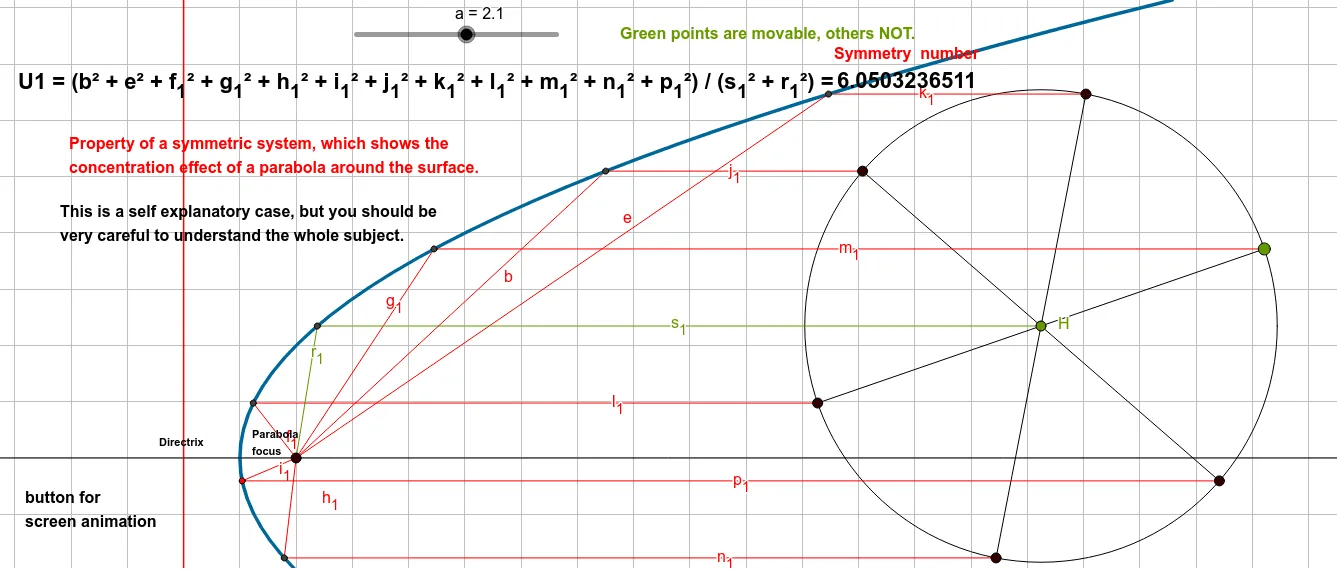
This GeoGebra example dynamically illustrates a geometric construction combining symmetry numbers with a parabolic mirror. It demonstrates how, based on the focus-directrix property of a parabola, a series of symmetric points and polygons are generated through rotations and reflections, using angles, segments, and intersections to form a mirror-symmetric pattern. Core mathematical concepts include the optical property of parabolas (parallel rays reflecting through the focus), symmetry transformations (rotation and reflection), geometric ratios and number patterns, as well as circumscribed/inscribed circles and polygons. The construction uses GeoGebra commands such as Line, Parabola, Circle, Point, Segment, Rotate, Angle, and Intersect, creating objects like A, B, C, f, c, a, H, d, M, i, M', α, k, M'', β, l, M''', γ, m, N, δ, n, N', ε, p, D, g, h, E, j, F, q, G, r, I, s, J, t, K, and b, with successive rotations and angle markings to build the symmetric design. It is suitable for high school and above students exploring geometric transformations, parabola properties, and symmetry aesthetics, and can be used in math labs or interdisciplinary art-math teaching.
GeoGebra Commands & Parameters
Line(B, C) → fParabola(A, f) → cCircle(H, a) → dPoint(d) → MSegment(H, M) → iRotate(M, 60°, H) → M'Angle(M, H, M') → αSegment(H, M') → kRotate(M', 60°, H) → M''Angle(M', H, M'') → βSegment(H, M'') → lRotate(M'', 60°, H) → M'''Angle(M'', H, M''') → γSegment(H, M''') → mRotate(M''', 60°, H) → NAngle(M''', H, N) → δSegment(H, N) → nRotate(N, 60°, H) → N'Angle(N, H, N') → εSegment(H, N') → pLine(D, A) → gLine(M, g) → hIntersect(c, h, 1) → ELine(M', g) → jIntersect(c, j, 1) → FLine(M'', g) → qIntersect(c, q, 1) → GLine(M''', g) → rIntersect(c, r, 1) → ILine(N, g) → sIntersect(c, s, 1) → JLine(N', g) → tIntersect(c, t, 1) → KSegment(G, A) → bSegment(F, A) → eSegment(I, A) → f_1Segment(E, A) → g_1Segment(J, A) → h_1Segment(K, A) → i_1Segment(M'', G) → j_1Segment(M', F) → k_1Segment(M''', I) → l_1Segment(M, E) → m_1Segment(N, J) → n_1Segment(N', K) → p_1Line(H, g) → q_1Intersect(c, q_1, 1) → LSegment(L, A) → r_1Segment(H, L) → s_1
AI Drawing Prompt Reference
Draw a parabola with a focus point and a horizontal directrix line. Center a circle at the focus and pick a point on it. Rotate this point around the focus by 60 degrees repeatedly to generate six equally spaced points, and connect the focus to each point with segments, marking the six 60-degree angles between adjacent segments. From the focus, draw an oblique line. Through each rotated point, draw a line parallel to this oblique line, intersecting the parabola at six distinct points. Connect each intersection point to the focus, and also connect each rotated point to its corresponding intersection point, forming a symmetric radial pattern. Finally, draw a line through the focus perpendicular to the oblique line, intersect it with the parabola, and connect that intersection to the focus.
The prompt above was compiled from the original drawing commands and is for reference only.