
Symmetries of Napoleon's Tessellation
Loading the math board and drawing, please wait…
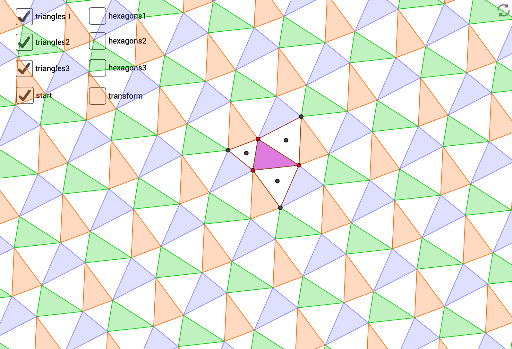
This example explores the symmetries of Napoleon's tessellation. Key mathematical concepts include polygons, rotation transformations, and vectors. Using GeoGebra commands such as Polygon, Rotate, and Vector, you can construct Napoleon's tessellation and investigate its symmetries. Suitable for high school mathematics education, particularly for topics related to geometric transformations and symmetry.
GeoGebra Commands & Parameters
Polygon(A, B, C) → poly1, c_1, a_1, b_1Polygon(A, C, 3) → poly2, d, e, f, DPolygon(C, B, 3) → poly3, g, h, i, EPolygon(B, A, 3) → poly4, j, k, l, FCircle(F, A, B) → pCircle(A, D, C) → qCircle(C, E, B) → rCenter(p) → GCenter(q) → HCenter(r) → IVector(B, D) → uVector(A, E) → vVector(C, F) → wSequence(Polygon[Translate[A, Vector[(n * u)]], Translate[B, Vector[(n * u)]], Translate[C, Vector[(n * u)]]], n, -10, 10) → list1Sequence(Translate[list1, Vector[(n * v)]], n, -10, 10) → list2Rotate(list2, 120°, I) → list3Rotate(list2, 240°, I) → list4Rotate(Translate[list2, Vector[(a * u) + (b * v) + (c * w)]], α, J) → triangles1Rotate(Translate[list3, Vector[(a * u) + (b * v) + (c * w)]], α, J) → triangles2Rotate(Translate[list4, Vector[(a * u) + (b * v) + (c * w)]], α, J) → triangles3Polygon(B, G, A, H, C, I) → poly5, b_2, g_1, a_2, h_1, c_2, i_1Sequence(Polygon[Translate[B, Vector[(n * u)]], Translate[G, Vector[(n * u)]], Translate[A, Vector[(n * u)]], Translate[H, Vector[(n * u)]], Translate[C, Vector[(n * u)]], Translate[I, Vector[(n * u)]]], n, -10, 10) → list5Sequence(Translate[list5, Vector[(n * v)]], n, -10, 10) → list6Rotate(list6, 120°, I) → list7Rotate(list6, 240°, I) → list8Rotate(Translate[list6, Vector[(a * u) + (b * v) + (c * w)]], α, J) → hexagons1Rotate(Translate[list7, Vector[(a * u) + (b * v) + (c * w)]], α, J) → hexagons2Rotate(Translate[list8, Vector[(a * u) + (b * v) + (c * w)]], α, J) → hexagons3Polygon(K, L, M, N, O, P) → poly6, k_1, l_1, m_1, n_1, o_1, p_1Rotate(K, 120°, J) → K'Rotate(L, 120°, J) → L'Rotate(M, 120°, J) → M'Rotate(N, 120°, J) → N'Rotate(O, 120°, J) → O'Rotate(P, 120°, J) → P'Polygon(K', L', M', N', O', P') → poly6', k', l', m', n', o', p'Rotate(K', 120°, J) → K''Rotate(L', 120°, J) → L''Rotate(M', 120°, J) → M''Rotate(N', 120°, J) → N''Rotate(O', 120°, J) → O''Rotate(P', 120°, J) → P''Polygon(K'', L'', M'', N'', O'', P'') → poly6'', k'', l'', m'', n'', o'', p''
AI Drawing Prompt Reference
Draw Napoleon's tessellation by first creating triangle ABC, then generating new triangles by rotating around each vertex, followed by using vectors and rotations to create a series of triangles and hexagons, and finally generating symmetric patterns through multiple rotations.
The prompt above was compiled from the original drawing commands and is for reference only.