
Symmetric Propeller
Loading the math board and drawing, please wait…
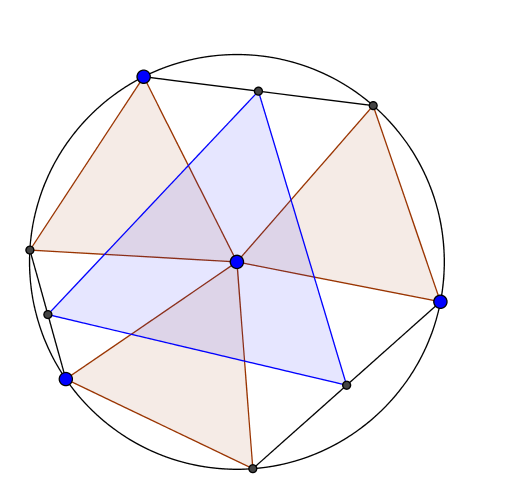
This example demonstrates the construction of a symmetric propeller shape by rotating an equilateral triangle. Core mathematical concepts include equilateral triangles, rotations, polygon construction, angle measurement, and geometric transformations. GeoGebra commands and objects used are Circle, Rotate, Polygon, Segment, Angle, Point, Similartriangle, and Midpoint. Suitable for high school students learning geometric transformations and spatial figures.
GeoGebra Commands & Parameters
Circle(D, E) → dRotate(B, 60°, A) → B'Polygon(A, B, C) → poly1, c, a, bSegment(A, C) → lSegment(C, B) → mSegment(B, A) → nAngle(B, A, B') → αPoint(d) → FSimilartriangle(A, B, C, D, E) → poly2, HSimilartriangle(A, B, C, D, F) → poly3, IPoint(d) → GSimilartriangle(A, B, C, D, G) → poly4, JSegment(G, I) → fSegment(J, E) → gSegment(H, F) → hMidpoint(E, J) → KMidpoint(G, I) → LMidpoint(F, H) → MPolygon(L, K, M) → poly5, m_1, l_1, k
AI Drawing Prompt Reference
Draw a symmetric propeller shape by starting with an equilateral triangle, rotating one of its vertices by 60 degrees around another vertex, and connecting these points to form a new triangle. Repeat this process to create multiple blades using rotations and similarity transformations, then connect the midpoints of the blades to form a central pentagon, showcasing the beauty of rotational and geometric transformations.
The prompt above was compiled from the original drawing commands and is for reference only.