
Surface Fit
Loading the math board and drawing, please wait…
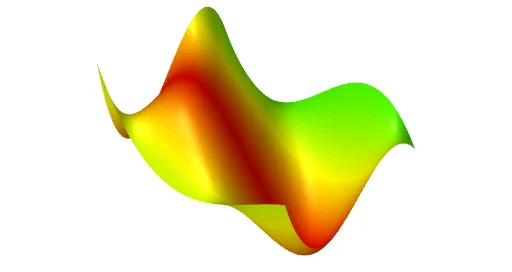
This example demonstrates how to fit a surface through a set of data points. It involves core mathematical concepts such as surface fitting, geometric distribution, unit circle, inequalities, and rotation. Key GeoGebra commands used include PointIn, Point, Sequence, FitPoly, Coefficients, Surface, and CurveCartesian for creating and fitting the surface. Suitable for high school and above students to learn about data fitting and 3D geometry.
GeoGebra Commands & Parameters
PointIn(Plane[A, Plane[xAxis, zAxis]]) → BPointIn(Plane[A, Plane[xAxis, zAxis]]) → CPointIn(Plane[A, Plane[xAxis, zAxis]]) → DPointIn(Plane[A, Plane[yAxis, zAxis]]) → EPoint(IntersectPath[Plane[B, Plane[yAxis, zAxis]], Plane[E, Plane[xAxis, zAxis]]]) → FPoint(IntersectPath[Plane[C, Plane[yAxis, zAxis]], Plane[E, Plane[xAxis, zAxis]]]) → GPoint(IntersectPath[Plane[D, Plane[yAxis, zAxis]], Plane[E, Plane[xAxis, zAxis]]]) → HPointIn(Plane[A, Plane[yAxis, zAxis]]) → IPointIn(Plane[A, Plane[yAxis, zAxis]]) → MPoint(IntersectPath[Plane[B, Plane[yAxis, zAxis]], Plane[I, Plane[xAxis, zAxis]]]) → JPoint(IntersectPath[Plane[C, Plane[yAxis, zAxis]], Plane[I, Plane[xAxis, zAxis]]]) → KPoint(IntersectPath[Plane[D, Plane[yAxis, zAxis]], Plane[I, Plane[xAxis, zAxis]]]) → LPoint(IntersectPath[Plane[B, Plane[yAxis, zAxis]], Plane[M, Plane[xAxis, zAxis]]]) → NPoint(IntersectPath[Plane[C, Plane[yAxis, zAxis]], Plane[M, Plane[xAxis, zAxis]]]) → OPoint(IntersectPath[Plane[D, Plane[yAxis, zAxis]], Plane[M, Plane[xAxis, zAxis]]]) → PSequence((x(Element[la, i]), z(Element[la, i])), i, 1, 4) → laxSequence((x(Element[le, i]), z(Element[le, i])), i, 1, 4) → lexSequence((x(Element[li, i]), z(Element[li, i])), i, 1, 4) → lixSequence((x(Element[lm, i]), z(Element[lm, i])), i, 1, 4) → lmxFitPoly(lax, 3) → faxFitPoly(lex, 3) → fexFitPoly(lix, 3) → fixFitPoly(lmx, 3) → fmxCoefficients(fax) → caxCoefficients(fex) → cexCoefficients(fix) → cixCoefficients(fmx) → cmxFitPoly(lcy3, 3) → fy3FitPoly(lcy2, 3) → fy2FitPoly(lcy1, 3) → fy1FitPoly(lcy0, 3) → fy0Surface(u, v, f(u, v), u, x(A), x(D), v, y(A), y(M)) → aCurveCartesian(t, y(E), fex(t), t, x(A), x(D)) → ceCurveCartesian(t, y(I), fix(t), t, x(A), x(D)) → ciCurveCartesian(t, y(A), fax(t), t, x(A), x(D)) → caCurveCartesian(t, y(M), fmx(t), t, x(A), x(D)) → cmCurveCartesian(x(A), t, f(x(A), t), t, y(A), y(M)) → caaCurveCartesian(x(B), t, f(x(B), t), t, y(A), y(M)) → cbCurveCartesian(x(C), t, f(x(C), t), t, y(A), y(M)) → ccCurveCartesian(x(D), t, f(x(D), t), t, y(A), y(M)) → cdSurface(u, v, f(u, v), u, A1, A2, v, y(A), y(M)) → B1Surface(u, v, f(u, v), u, A2, A3, v, y(A), y(M)) → B2Surface(u, v, f(u, v), u, A3, A4, v, y(A), y(M)) → B3Surface(u, v, f(u, v), u, A4, A5, v, y(A), y(M)) → B4Surface(u, v, f(u, v), u, A5, A6, v, y(A), y(M)) → B5Surface(u, v, f(u, v), u, A6, A7, v, y(A), y(M)) → B6Surface(u, v, f(u, v), u, A7, A8, v, y(A), y(M)) → B7Surface(u, v, f(u, v), u, A8, A9, v, y(A), y(M)) → B8Surface(u, v, f(u, v), u, A9, A10, v, y(A), y(M)) → B9Surface(u, v, f(u, v), u, A10, A11, v, y(A), y(M)) → B10Surface(u, v, f(u, v), u, A11, A12, v, y(A), y(M)) → B11Surface(u, v, f(u, v), u, A12, A13, v, y(A), y(M)) → B12Surface(u, v, f(u, v), u, A13, A14, v, y(A), y(M)) → B13Surface(u, v, f(u, v), u, A14, A15, v, y(A), y(M)) → B14Surface(u, v, f(u, v), u, A15, A16, v, y(A), y(M)) → B15Surface(u, v, f(u, v), u, A16, A17, v, y(A), y(M)) → B16Surface(u, v, f(u, v), u, A17, A18, v, y(A), y(M)) → B17Surface(u, v, f(u, v), u, A18, A19, v, y(A), y(M)) → B18Surface(u, v, f(u, v), u, A19, A20, v, y(A), y(M)) → B19Surface(u, v, f(u, v), u, A20, A21, v, y(A), y(M)) → B20Surface(u, v, f(u, v), u, A21, A22, v, y(A), y(M)) → B21Surface(u, v, f(u, v), u, A22, A23, v, y(A), y(M)) → B22Surface(u, v, f(u, v), u, A23, A24, v, y(A), y(M)) → B23Surface(u, v, f(u, v), u, A24, A25, v, y(A), y(M)) → B24Surface(u, v, f(u, v), u, A25, A26, v, y(A), y(M)) → B25Surface(u, v, f(u, v), u, A26, A27, v, y(A), y(M)) → B26Surface(u, v, f(u, v), u, A27, A28, v, y(A), y(M)) → B27Surface(u, v, f(u, v), u, A28, A29, v, y(A), y(M)) → B28Surface(u, v, f(u, v), u, A29, A30, v, y(A), y(M)) → B29Surface(u, v, f(u, v), u, A30, A31, v, y(A), y(M)) → B30Surface(u, v, f(u, v), u, A31, A32, v, y(A), y(M)) → B31Surface(u, v, f(u, v), u, A32, A33, v, y(A), y(M)) → B32Surface(u, v, f(u, v), u, A33, A34, v, y(A), y(M)) → B33Surface(u, v, f(u, v), u, A34, A35, v, y(A), y(M)) → B34Surface(u, v, f(u, v), u, A35, A36, v, y(A), y(M)) → B35Surface(u, v, f(u, v), u, A36, A37, v, y(A), y(M)) → B36Surface(u, v, f(u, v), u, A37, A38, v, y(A), y(M)) → B37Surface(u, v, f(u, v), u, A38, A39, v, y(A), y(M)) → B38Surface(u, v, f(u, v), u, A39, A40, v, y(A), y(M)) → B39Surface(u, v, f(u, v), u, A40, A41, v, y(A), y(M)) → B40Surface(u, v, f(u, v), u, A41, A42, v, y(A), y(M)) → B41Surface(u, v, f(u, v), u, A42, A43, v, y(A), y(M)) → B42Surface(u, v, f(u, v), u, A43, A44, v, y(A), y(M)) → B43Surface(u, v, f(u, v), u, A44, A45, v, y(A), y(M)) → B44Surface(u, v, f(u, v), u, A45, A46, v, y(A), y(M)) → B45Surface(u, v, f(u, v), u, A46, A47, v, y(A), y(M)) → B46Surface(u, v, f(u, v), u, A47, A48, v, y(A), y(M)) → B47Surface(u, v, f(u, v), u, A48, A49, v, y(A), y(M)) → B48Surface(u, v, f(u, v), u, A49, A50, v, y(A), y(M)) → B49Surface(u, v, f(u, v), u, A50, A51, v, y(A), y(M)) → B50Surface(u, v, f(u, v), u, A51, A52, v, y(A), y(M)) → B51
AI Drawing Prompt Reference
Create a surface that fits a set of data points. Start by creating points A, B, C, D, E, F, G, H, I, and M on specified planes, then generate intersection points of paths, fit polynomial functions to these intersection points, and finally draw the surface using the fitted polynomial functions, including paths from point A to point M and from point A to point D.
The prompt above was compiled from the original drawing commands and is for reference only.