
Surface Area of a Sphere by Jennifer Silverman
Loading the math board and drawing, please wait…
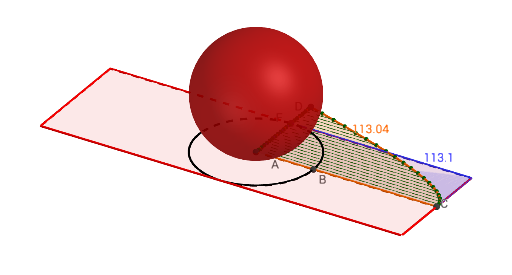
This example demonstrates the dynamic calculation of a sphere's surface area. Key math concepts include sphere geometry, surface area formula, and analytical geometry. GeoGebra commands and objects used are Intersect, Circle, Segment, OrthogonalLine, Polygon, Sphere, Sequence, and Point. Suitable for high school students learning solid geometry and analytical geometry.
GeoGebra Commands & Parameters
Intersect(circle, l_5, 1) → BCircle(B, (π / 2 * radius)) → c_1Intersect(c_1, l_5, 1) → LSegment(L, B) → oIntersect(xAxis, yAxis) → ACircle(A, o) → c_2Intersect(c_2, yAxis, 2) → DSegment(A, D) → p_2Circle(B, Radius[circle]) → c_3Intersect(circle, p_2, 1) → FIntersect(circle, yAxis, 1) → GOrthogonalLine(F, p_2) → l_3OrthogonalLine(G, yAxis) → l_1Intersect(l_4, l_3) → IIntersect(l_4, l_1) → JIntersect(l_2, l_1) → KIntersect(l_2, l_3) → HPolygon(J, K, H, I) → poly1, n, l, k, mSegment(A, F) → pSegment(A, B) → u_1Intersect(m, xAxis) → EIntersect(l, xAxis) → CSphere(B_1, A_1) → o_1Sequence((radius * cos((π * w / ((2 * b))))), w, 0, b) → list3Sequence(((Element[list3, w] * π), (p_2 * (w - 1) / b)), w, 1, b) → list4Sequence((0, (p_2 * t / b)), t, 0, b, 1) → list1Sequence((0, (p * t / b)), t, 0, b, 1) → list2Sequence(Segment[Element[list1, u], Point[Circle[Element[list1, u], Element[list4, u]]]], u, 1, b) → list5Polygon(F, H, C, A) → poly3, f, h, e, dPoint(list4) → NPoint(list4) → OPoint(list4) → PPoint(list4) → QPoint(list4) → RPoint(list4) → SPoint(list4) → TPoint(list4) → UPoint(list4) → VPoint(list4) → WPoint(list4) → ZPoint(list4) → C_1Point(list4) → D_1Point(list4) → E_1Point(list4) → F_1Point(list4) → G_1Point(list4) → H_1Point(list4) → I_1Point(list4) → J_1Point(list4) → K_1Point(list1) → L_1Point(list1) → M_1Polygon(N, O, Z, C_1, D_1, E_1, F_1, G_1, H_1, I_1, J_1, K_1, P, L_1, M_1, Q, R, S, T, U, V, W) → poly2, n_1, w, z_1, c_4, d_1, e_1, f_1, g_1, h_1, i_1, j_1, o_2, k_1, l_6, m_1, p_1, q, r, s, t, u, v
AI Drawing Prompt Reference
Draw a sphere and demonstrate the dynamic calculation of its surface area. Start by drawing a circle, find its intersection with a vertical line, and use this point to draw a larger circle. Locate the intersection of this larger circle with the vertical line and connect these two points. Draw a circle with this line segment as the diameter. Then, find the intersection of this circle with the vertical line and connect it to the center of the sphere. Finally, form a polygon using these points and lines, and use sequences to generate multiple points, connecting them to dynamically display the surface area of the sphere.
The prompt above was compiled from the original drawing commands and is for reference only.