
Surface Area of a Cuboid: Fold/Unfold Animation
Loading the math board and drawing, please wait…
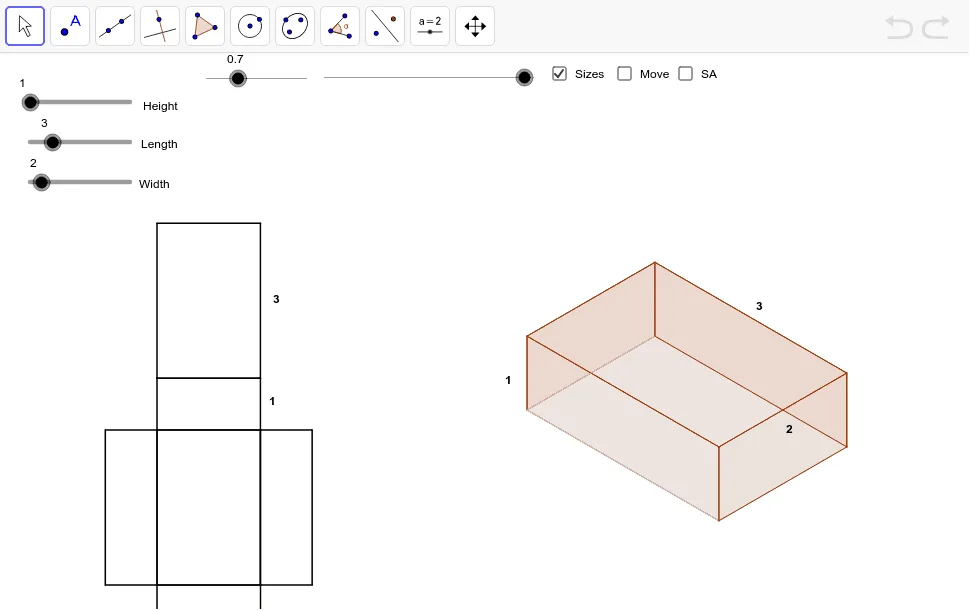
This GeoGebra example presents an animated cuboid that folds from a 2D net into a 3D solid, clearly demonstrating how the surface area is calculated as the sum of six rectangular faces. The core mathematical concept is solid geometry, specifically the surface area formula for a cuboid (2lw + 2lh + 2wh), and the spatial relationship between a net and its folded form. The construction uses GeoGebra commands including Vector to define edge directions, Polygon to create each face, If to control the folding animation states, Midpoint for positioning, and Area to compute face areas. The dimensions can be adjusted interactively, and the surface area is displayed dynamically. This resource is suitable for middle school to high school students learning introductory solid geometry, and for teachers demonstrating surface area derivation in class. It enhances spatial visualization and reinforces the connection between 2D nets and 3D shapes.
GeoGebra Commands & Parameters
Vector(PTP_1, PB_3) → tpsbVector(PTPF_1, PTP_1) → tpf1Vector(PTP, PB_2) → tpa1Vector(PTPF, PTP) → tpfVector(PBK, PB) → bk1Vector(PBK_1, PB_1) → bk11Vector(PFT_1, PB_3) → ftb13Vector(PFT, PB_2) → fta1Vector(PSB_1, PB_3) → sbb13Vector(PSB, PB_1) → sbbVector(PSF_1, PB_2) → sfa1Vector(PSF, PB) → sfbPolygon(SF_3, SF, SF_1, SF_2) → aSideFront, a, b, c, dIf(dist < 100.0, PTPF + (dist * Length[tpf] / 100.0; Angle[tpf]), PTP + ((dist - 100.0) * Length[tpa1] / 100.0; Angle[tpa1])) → TP_3If(dist < 100.0, PTPF_1 + (dist * Length[tpf1] / 100.0; Angle[tpf1]), PTP_1 + ((dist - 100.0) * Length[tpsb] / 100.0; Angle[tpsb])) → TP_2Polygon(TP_3, TP_2, TP_1, TP) → aTop, a_1, b_1, c_1, d_1Polygon(BK_3, BK_2, BK_1, BK) → aBack, a_2, b_2, c_2, d_2Polygon(BT, BT_1, BT_2, BT_3) → aBottom, a_3, b_3, c_3, d_3Polygon(SB, SB_1, SB_2, SB_3) → aSideBack, a_4, b_4, c_4, d_4Polygon(FT, FT_1, FT_2, FT_3) → aFront, a_5, b_5, c_5, d_5Polygon(NA_2, NA, NA_1, NA_3) → planBottom, na_2, na, na_1, na_3Polygon(NA_2, NA_3, NFT_1, NFT) → planFront, na_4, na_5, nft_1, nftPolygon(NA, NSF, NSF_1, NA_2) → planSideFront, na_6, nsf, nsf_1, na_7Polygon(NA_1, NSB, NSB_1, NA_3) → planSideBack, na_8, nsb, nsb_1, na_9Polygon(NA, NBK, NBK_1, NA_1) → planBack, na_{10}, nbk, nbk_1, na_{11}Polygon(NBK, NTPT, NTPF_1, NBK_1) → planTop, nbk_2, ntpt, ntpf_1, nbk_3Midpoint(nft_1) → HnfMidpoint(ntpf_1) → HplMidpoint(nbk_1) → HpbMidpoint(b_1) → HXtsMidpoint(d_2) → HXbsMidpoint(c_5) → HXfsArea(BK_3, BK_2, BK_1, BK) → bb
AI Drawing Prompt Reference
Draw a net of a cuboid and then fold it into a 3D shape. Start by drawing six rectangular faces representing the front, back, left, right, top, and bottom of the cuboid. Then, adjust the positions and angles of the rectangles to simulate the folding process from the net to the 3D shape. Finally, calculate and display the area of each rectangle to show the surface area formula: 2lw + 2lh + 2wh.
The prompt above was compiled from the original drawing commands and is for reference only.