
Animated Net of a Square Pyramid by Danielle
Loading the math board and drawing, please wait…
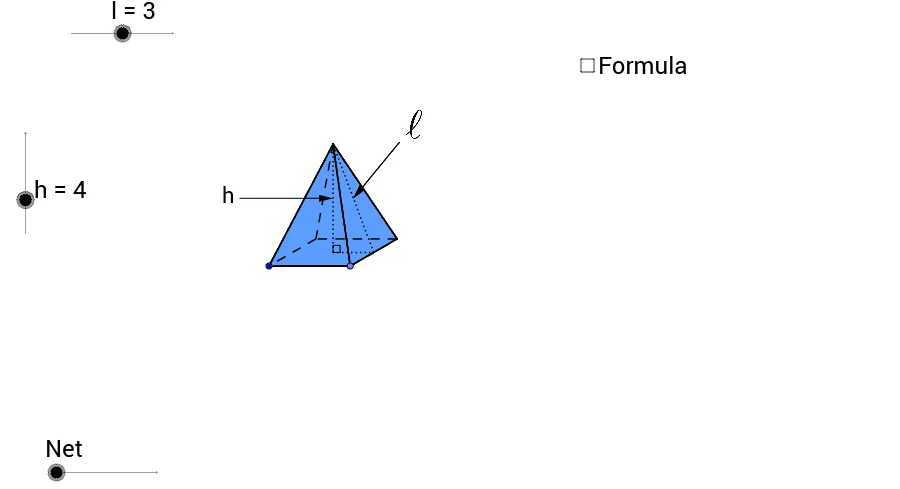
This example demonstrates the animated net of a square pyramid, illustrating key concepts in solid geometry and polygonal unfolding. It utilizes various GeoGebra commands like Point, Segment, Line, Circle, Intersect, Rotate, Polygon, etc., to construct and animate the net. Ideal for high school geometry education and spatial visualization understanding.
GeoGebra Commands & Parameters
Point(Circle[A, l]) → BSegment(A, B) → aLine(A, B) → b_2Circle(B, 3.0 * l / 4.5) → cIntersect(c, b_2, 2.0) → CRotate(C, 30.0*°, B) → C'Line(C', b_2) → dSegment(B, C') → eLine(A, e) → fIntersect(d, f) → DPolygon(A, B, C', D) → poly1, a_1, b_1, c', d_1Segment(A, C') → gSegment(D, B) → h_1Intersect(g, h_1) → EOrthogonalLine(E, a_1) → iCircle(E, h) → kIntersect(k, i, 2.0) → FSegment(B, F) → jSegment(C', F) → l_5Segment(F, D) → mSegment(F, A) → nSegment(E, F) → pSegment(A, D) → qMidpoint(b_1) → GSegment(G, F) → rAngle(G, E, F) → αSegment(E, G) → tLine(E, G) → c_1Circle(G, F) → f_1Intersect(f_1, c_1, 2.0) → HIntersect(c_1, d_1) → ICircle(I, F) → g_1Intersect(g_1, c_1, 1.0) → JVector(F, J) → uPoint(c') → LCircle(L, F) → q_1Vector(F, H) → wMidpoint(A, B) → KLine(K, E) → e_1Circle(K, h) → p_1Intersect(e_1, c') → MCircle(M, h) → r_1Intersect(r_1, e_1, 2.0) → NIntersect(p_1, e_1, 1.0) → OVector(F, N) → vVector(F, O) → zTranslate(F, Vector[z * o]) → F'_1Translate(F, Vector[u * (o - 1.0)]) → F'_2Translate(F, Vector[v * (o - 2.0)]) → F'_3Translate(F, Vector[w * (o - 3.0)]) → F'Segment(F, N) → sLineBisector(s) → a_2Intersect(a_2, c') → PCircleArc(P, N, F) → c_2Ray(P, F'_3) → d_2Intersect(c_2, d_2, 1.0) → QSegment(F, O) → e_2LineBisector(e_2) → f_2Intersect(f_2, a_1) → RCircleArc(R, F, O) → g_2Ray(R, F'_1) → h_2Intersect(g_2, h_2, 1.0) → SCircleArc(I, F, J) → k_2CircleArc(G, H, F) → p_2Ray(I, F'_2) → i_2Intersect(k_2, i_2, 1.0) → TRay(G, F') → j_2Intersect(p_2, j_2, 1.0) → UCircle(I, E) → s_1OrthogonalLine(I, a_1) → i_1Intersect(s_1, i_1, 2.0) → VIntersect(s_1, i_1, 1.0) → WOrthogonalLine(V, i_1) → j_1OrthogonalLine(W, i_1) → k_1OrthogonalLine(G, k_1) → l_1Intersect(j_1, l_1) → ZIntersect(k_1, l_1) → A_1Midpoint(V, Z) → B_1Midpoint(A_1, W) → C_1Circle(B_1, r) → t_1Circle(C_1, r) → q_2OrthogonalLine(B_1, k_1) → m_1Intersect(t_1, m_1, 1.0) → D_1Intersect(q_2, m_1, 2.0) → E_1Vector(C', Z) → u_1Vector(B, A_1) → v_1Vector(N, D_1) → w_1Vector(O, E_1) → z_1Translate(N, Vector[w_1 * (o - 4.0)]) → N'Translate(O, Vector[z_1 * (o - 4.0)]) → O'Translate(B, Vector[v_1 * (o - 4.0)]) → B'Translate(A, Vector[v_1 * (o - 4.0)]) → A'Translate(C', Vector[u_1 * (o - 4.0)]) → C''Translate(D, Vector[u_1 * (o - 4.0)]) → D'If(o < 1.0, S, If[o < 4.0, O, If[o < 5.0, O', E_1]]) → F_1If(o < 1.0, F, If[o < 2.0, T, J]) → G_1If(o < 3.0, F, If[o < 4.0, U, H]) → H_1If(o < 2.0, F, If[o < 3.0, Q, If[o < 4.0, N, If[o < 5.0, N', D_1]]]) → I_1If(o < 4.0, A, If[o < 5.0, A', W]) → J_1If(o < 4.0, B, If[o < 5.0, B', A_1]) → K_1If(o < 4.0, C', If[o < 5.0, C'', Z]) → L_1If(o < 4.0, D, If[o < 5.0, D', V]) → M_1Polygon(F_1, J_1, K_1) → poly2, k_3, f_3, j_3Polygon(L_1, H_1, K_1) → poly3, k_4, l_2, h_3Polygon(L_1, I_1, M_1) → poly4, m_2, l_3, i_3Polygon(M_1, G_1, J_1) → poly5, j_4, m_3, g_3Intersect(m, j_3) → N_1Segment(I_1, N_1) → n_1Intersect(j_3, i_3) → O_1Intersect(c', i_3) → Q_1Intersect(c', i_3) → R_1Intersect(c', i_3) → S_1Intersect(c', i_3) → U_1Intersect(c', i_3) → A_2Intersect(l_2, i_3) → B_2Segment(B_2, O_1) → n_2Segment(B_2, M_1) → r_2Midpoint(M_1, L_1) → C_2Midpoint(L_1, K_1) → D_2Midpoint(K_1, J_1) → E_2Midpoint(J_1, M_1) → F_2Segment(G_1, F_2) → s_2Segment(C_2, I_1) → t_2Segment(D_2, H_1) → a_3Segment(E_2, F_1) → b_3Polygon(J_1, M_1, L_1, K_1) → poly6, j_5, m_4, l_4, k_5Intersect(j_3, d_1) → P_1Segment(P_1, M_1) → c_3Midpoint(p) → V_1OrthogonalLine(V_1, p) → d_3Point(d_3) → W_1Vector(W_1, V_1) → u_2Midpoint(r) → T_1Midpoint(a_3) → Z_1Point(a_2) → G_2Vector(G_2, T_1) → v_2Vector(G_2, Z_1) → w_2Point(Circle[H_2, l]) → I_2Segment(H_2, I_2) → e_3Line(H_2, I_2) → bCircle(I_2, 3.0 * l / 4.5) → p_3Intersect(p_3, b, 2.0) → J_2Rotate(J_2, 30.0*°, I_2) → K_2Segment(I_2, K_2) → n_3Line(K_2, b) → q_3Line(H_2, n_3) → r_3Intersect(q_3, r_3) → L_2Segment(H_2, K_2) → s_3Segment(I_2, L_2) → t_3Intersect(s_3, t_3) → M_2Circle(M_2, h) → c_4OrthogonalLine(M_2, b) → a_4Intersect(c_4, a_4, 2.0) → N_2Polygon(H_2, N_2, I_2) → poly7, i_4, h_4, n_4Polygon(I_2, N_2, K_2) → poly8, k_6, i_5, n_5Polygon(H_2, L_2, K_2, I_2) → poly9, h_5, l_6, k_7, i_6Polygon(H_2, N_2, L_2) → poly10, l_7, h_6, n_6Polygon(L_2, N_2, K_2) → poly11, k_8, l_8, n_7Midpoint(k_7) → O_2Segment(M_2, O_2) → b_4Segment(M_2, N_2) → d_4Segment(N_2, O_2) → e_4Angle(O_2, M_2, N_2) → βMidpoint(N_2, M_2) → P_2Midpoint(O_2, N_2) → Q_2Line(P_2, Q_2) → f_4Circle(P_2, l) → g_4Intersect(g_4, f_4, 1.0) → R_2Intersect(g_4, f_4, 2.0) → S_2Vector(R_2, P_2) → z_2Vector(S_2, Q_2) → u_3Midpoint(b_3) → V_2
AI Drawing Prompt Reference
Draw an unfolded net of a square pyramid, starting with a square. From one vertex, draw three line segments of length equal to half the square's side, forming an equilateral triangle. Connect the remaining three vertices of the square to the triangle's vertices, creating a tetrahedral net. Animate the net to fold into a tetrahedron, highlighting the relationship between the net and the 3D shape.
The prompt above was compiled from the original drawing commands and is for reference only.