
Surface Area Exploration Model
Loading the math board and drawing, please wait…
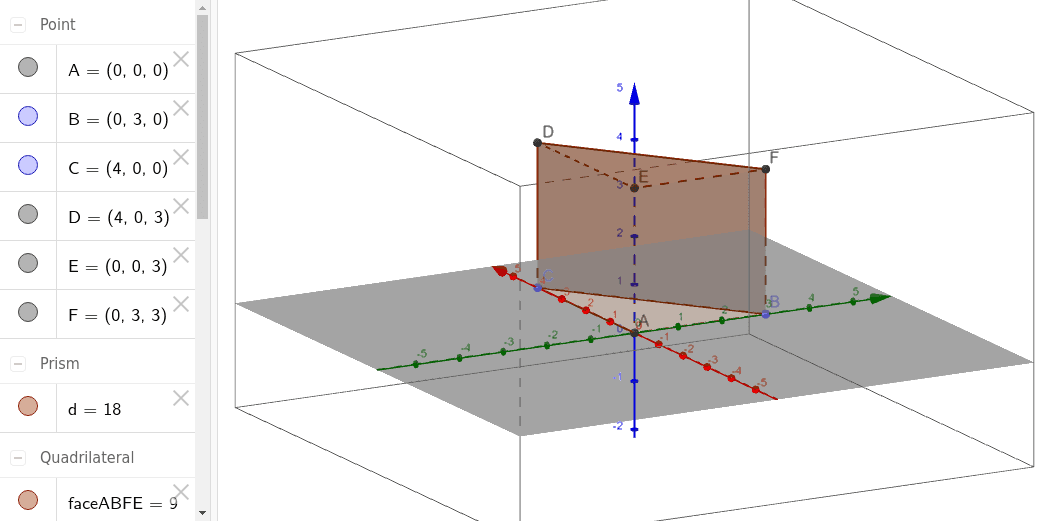
This example demonstrates a manipulable geometric model to explore the concept of surface area. Key mathematical concepts include solid geometry surface area calculation, geometric construction techniques, and polyhedral surface unfolding. Construction involves GeoGebra commands such as Intersect, Point, Polygon, and Prism, with objects like points A, B, C, polygon poly1, and edges edgeCD, edgeAE. Suitable for middle or high school mathematics courses for practical understanding of surface area computation and geometric modeling.
GeoGebra Commands & Parameters
Intersect(yAxis, zAxis) → APoint(yAxis) → BPoint(xAxis) → CPolygon(C, A, B) → poly1, b, c, aPrism(poly1, -3) → d, D, edgeBF, edgeDE, edgeEF, edgeDF, E, F, faceACDE, faceABFE, faceBCDF, faceDEF, edgeCD, edgeAE
AI Drawing Prompt Reference
Draw a 3D model made from a triangle and a rectangle, connecting their vertices to form a prism. The model should show three faces: the triangular face, the rectangular face, and the connecting side. Ensure the drawing is clear and lines are distinct, suitable for teaching surface area exploration in mathematics.
The prompt above was compiled from the original drawing commands and is for reference only.