
Surface Area Calculation
Loading the math board and drawing, please wait…
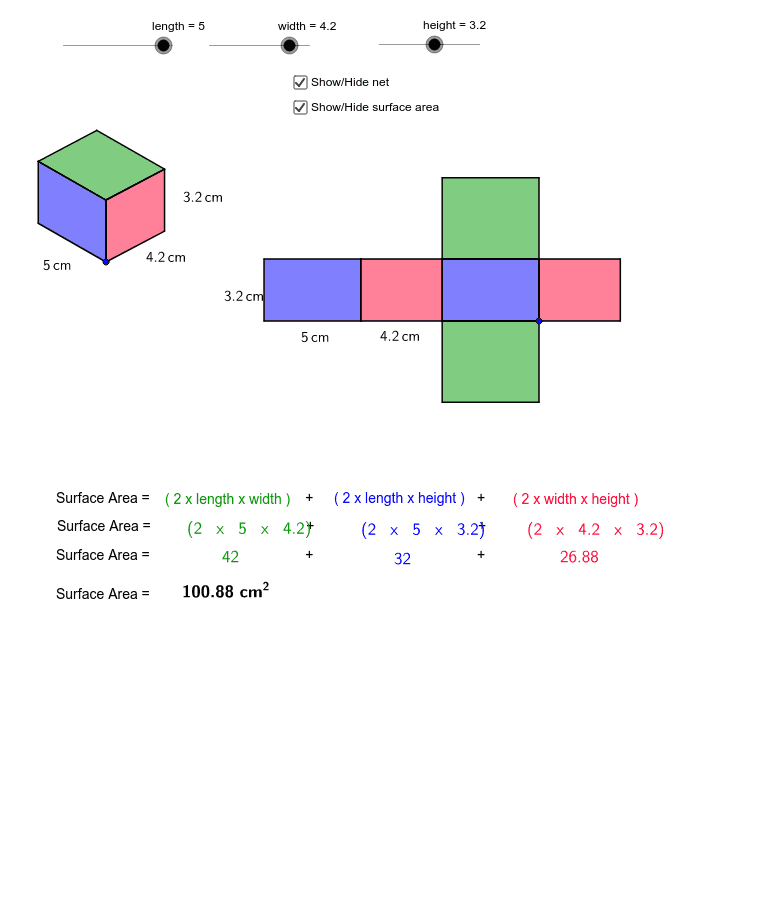
This example demonstrates how to calculate the surface area of a polygon using vectors, translation, and geometric constructions; Core math concepts include area, surface, median value, line segment, geometric mean, and similarity transformation; Construction highlights involve commands/objects like Vector, Translate, Polygon, Line, Intersect, and Midpoint in GeoGebra; Suitable for high school students learning solid geometry and geometric constructions.
GeoGebra Commands & Parameters
Vector(A, B) → uVector(A, C) → vVector(A, D) → wTranslate(E, Vector[(height * u)]) → E'Vector(E, E') → zTranslate(E, Vector[(width * w)]) → E'_1Translate(E, Vector[(length * v)]) → E'_2Translate(E'_2, Vector[(height * u)]) → FTranslate(E'_1, Vector[(height * u)]) → GPolygon(F, E'_2, E, E') → poly1, f, e'_2, e, e'Polygon(E, E'_1, G, E') → poly2, e_1, e'_1, g, e'_3Line(F, g) → dLine(G, e') → hIntersect(d, h) → HPolygon(F, E', G, H) → poly3, f_1, e'_4, g_1, h_1Polygon(J, I, K, L) → poly4, j, i, k, lPolygon(N, J, I, M) → poly5, n, j_1, i_1, mPolygon(N, P, O, M) → poly6, n_1, p, o, m_1Polygon(Q, R, N, J) → poly7, q, r, n_2, j_2Polygon(T, S, I, M) → poly8, t, s, i_2, m_2Polygon(V, U, O, P) → poly9, v_1, u_1, o_1, p_1Midpoint(e'_2) → WMidpoint(e_1) → ZMidpoint(e'_1) → A_1Midpoint(v_1) → B_1Midpoint(u_1) → C_1Midpoint(o) → D_1Midpoint(m_2) → E_1Midpoint(t) → F_1
AI Drawing Prompt Reference
Draw a 3D shape composed of multiple quadrilaterals, including two bases and six sides. First, create vectors u, v, and w, then use these vectors to construct the sides and bases through translation and polygon creation. Next, find the intersection lines between the sides and bases using the intersect command, and finally, find the midpoints of various line segments using the midpoint command.
The prompt above was compiled from the original drawing commands and is for reference only.