
Surface Area and Volume of a Frustum from a Cone
Loading the math board and drawing, please wait…
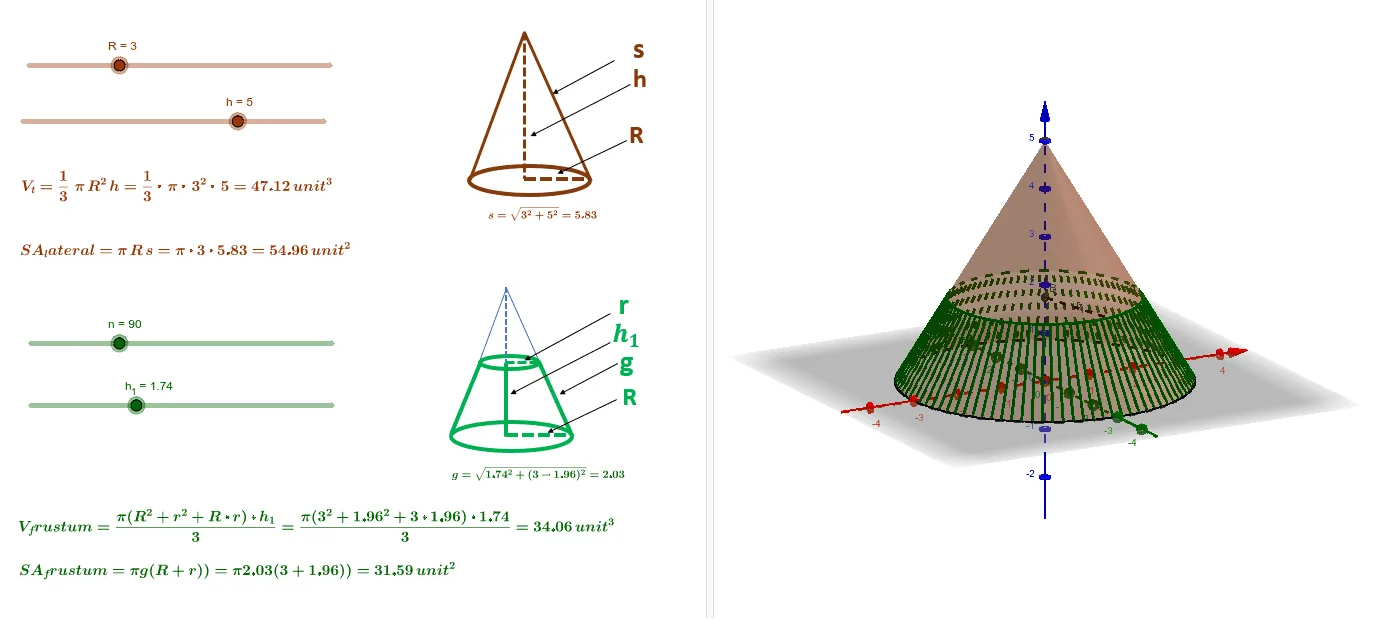
This interactive GeoGebra example dynamically demonstrates the surface area and volume of a frustum (truncated cone) obtained by cutting a cone with a plane. It visualizes the lateral surface, base areas, total surface area, and volume, emphasizing concepts such as similar triangles, the Pythagorean theorem, and three-dimensional vector geometry. The construction uses GeoGebra commands like Intersect, Cone, Circle, IntersectPath, Point, Segment, and Sequence to build the cone, the cutting plane, and the resulting circular cross-section. Sliders (n, h) allow users to adjust parameters in real time, while text objects display computed values for surface area (saf) and volume (vf). This resource is suitable for high school or early college students studying solid geometry, spatial reasoning, and formula derivation, and serves as an effective tool for classroom demonstrations or independent exploration of how changing dimensions affect the frustum's measurements.
GeoGebra Commands & Parameters
Intersect(xAxis, yAxis) → ACircle(A, R) → cCone(A, H, R) → d, e, fIntersectPath(b, d) → kPoint(k) → CSegment(B, C) → r_1Sequence(((r_1 * cos(((i * 2) * π / n))), (r_1 * sin(((i * 2) * π / n))), h_1), i, 0, n - 1) → list4Sequence(((R * cos(((i * 2) * π / n))), (R * sin(((i * 2) * π / n))), 0), i, 0, n - 1) → list3Sequence(Segment[Element[list3, j], Element[list4, j]], j, 0, n - 1) → list5