
Supplementary Angles Practice: Find the Missing Angle (GeoGebra Interactive)
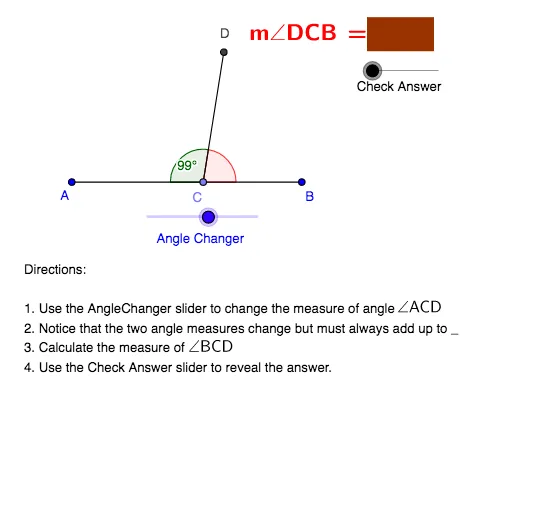
Loading the math board and drawing, please wait…
In collections
Some terms & definitions. Angles, angle pairs, angle measure
This example uses an interactive geometry figure to demonstrate the measure relationship of supplementary angles and helps learners determine a missing angle. The key math concepts are supplementary angles (two angles whose measures sum to 180°), angle measure, and geometric construction/verification. Construction-wise, it builds the angle sides with Segment and key points (e.g., A, B, C, D and related labeled points), places and manipulates the configuration using Point, and uses Rotate to position the angle accurately. It then uses Angle to label and measure the relevant angles (β, γ, etc.), optionally uses Polygon for an auxiliary shape, and leverages Vector and Translate for controlled direction/placement. Interactivity and correctness checking are handled by AngleChanger and CheckAnswer, comparing the computed angles with target/primed objects (e.g., e vs e', f vs f', etc.). Suitable for middle and high school geometry practice, classroom demonstrations, and formative assessment.
GeoGebra Commands & Parameters
Segment(A, B) → aPoint(a) → CRotate(A, (-AngleChanger), C) → DAngle(D, C, A) → βSegment(C, D) → bAngle(B, C, D) → γPolygon(E, F, G, H) → P, e, f, g, hVector((0, 0), (CheckAnswer, 0)) → uTranslate(E, u) → E'Translate(F, u) → F'Translate(G, u) → G'Translate(H, u) → H'Polygon(E', F', G', H') → P', e', f', g', h'
AI Drawing Prompt Reference
Create an interactive geometry figure for practicing supplementary angles. Start by drawing a horizontal segment and place a point on it as the vertex. Construct another ray from this vertex by rotating it, forming two adjacent angles that can be dynamically adjusted. Mark both angles with arcs and display their measures, ensuring they sum to 180 degrees. Additionally, place a quadrilateral on one side and translate a copy horizontally to assist in verification or answer display. Keep the layout clear for observing angle changes and the supplementary relationship.
The prompt above was compiled from the original drawing commands and is for reference only.