
Theodorus (Pythagorean) Spiral: Irrational Lengths from Repeated Right Triangles
Loading the math board and drawing, please wait…
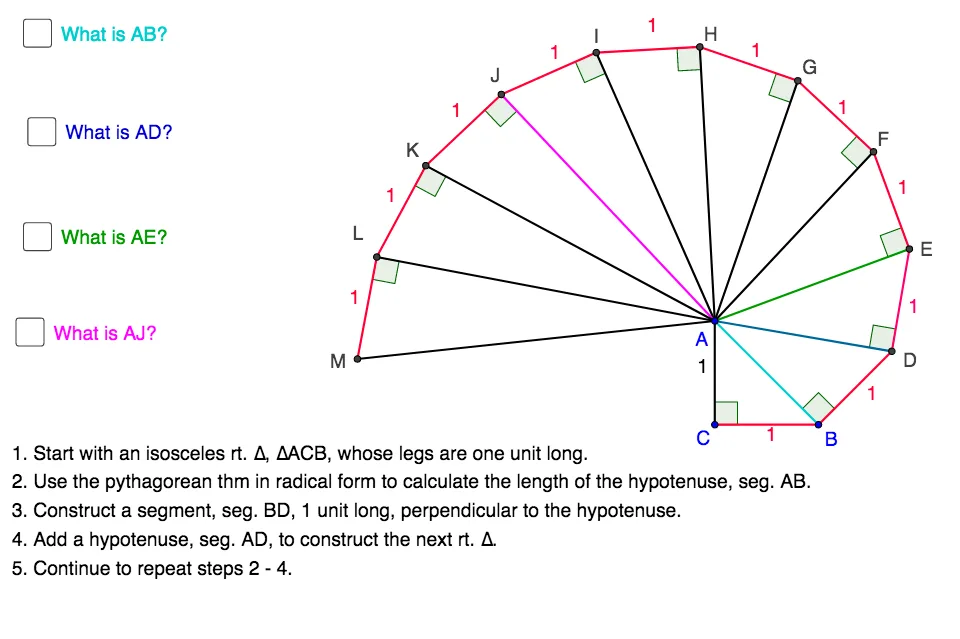
This example demonstrates the construction of the Theodorus spiral (also called the square-root spiral or Pythagorean spiral), built step-by-step by attaching right triangles. The main phenomenon is that each new triangle introduces new lengths, and many of these lengths are irrational square roots (e.g., √2, √3, √5, …), producing a clear spiral locus. Key math concepts include the Pythagorean theorem, geometric construction with right triangles, square roots as lengths, and the idea of a locus generated by iterative constraints; it can also motivate connections to quadratic equations via “root” lengths. In GeoGebra, the spiral is formed by: constructing segments with Segment; defining required angles using Angle and creating perpendicular lines with OrthogonalLine; drawing circles with Circle; and using Intersect to compute intersection points that determine the next vertex. The listed objects (numerous labeled points such as A, B, C, D, E, F, G, H, I, together with angles and constructed lines) reflect this iterative build process and the resulting spiral curve. Suitable for secondary-school advanced geometry, enrichment lessons, and teaching geometric construction leading to discovery of irrational values.
GeoGebra Commands & Parameters
Segment(A, C) → aSegment(C, B) → bSegment(B, A) → cAngle(A, C, B) → αOrthogonalLine(B, c) → dCircle(B, a) → eIntersect(e, d) → D, E_1Segment(A, D) → fSegment(B, D) → gAngle(D, B, A) → βOrthogonalLine(D, f) → hCircle(D, 1) → kIntersect(k, h, 2) → ESegment(E, D) → iSegment(E, A) → jAngle(E, D, A) → γOrthogonalLine(E, j) → lCircle(E, 1) → pIntersect(p, l, 1) → FSegment(A, F) → mSegment(F, E) → nAngle(F, E, A) → δOrthogonalLine(F, m) → qCircle(F, E) → rIntersect(r, q, 2) → GSegment(G, F) → sSegment(G, A) → tAngle(G, F, A) → εOrthogonalLine(G, t) → a_1Circle(G, F) → c_1Intersect(c_1, a_1, 1) → HSegment(H, A) → b_1Segment(H, G) → d_1OrthogonalLine(H, b_1) → e_1Circle(H, G) → f_1Intersect(f_1, e_1, 1) → ISegment(H, I) → g_1Segment(I, A) → h_1OrthogonalLine(I, h_1) → i_1Circle(I, H) → k_1Intersect(k_1, i_1, 1) → JSegment(J, A) → j_1Segment(J, I) → l_1OrthogonalLine(J, j_1) → m_1Circle(J, I) → p_1Intersect(p_1, m_1, 1) → KSegment(K, A) → n_1Segment(J, K) → q_1OrthogonalLine(K, n_1) → r_1Circle(K, J) → s_1Intersect(s_1, r_1, 1) → LSegment(L, A) → t_1Segment(K, L) → a_2Angle(H, G, A) → ζAngle(I, H, A) → ηAngle(J, I, A) → θAngle(K, J, A) → ιAngle(L, K, A) → κOrthogonalLine(L, t_1) → b_2Circle(L, K) → c_2Intersect(c_2, b_2, 1) → MSegment(L, M) → d_2Segment(M, A) → e_2Angle(A, L, M) → λ
AI Drawing Prompt Reference
Please draw a spiral formed by repeatedly attaching right triangles. Start with a right triangle with legs of length 1 and 1, and hypotenuse √2. Next, attach a new right triangle using the previous hypotenuse as one leg, creating a triangle with hypotenuse √3. Continue this process, where each new triangle's hypotenuse becomes a leg of the next triangle, generating a spiral curve with increasing leg and hypotenuse lengths. The key elements include the starting point, vertices of each new triangle, and the spiral's endpoint. Ensure the spiral extends outward smoothly.
The prompt above was compiled from the original drawing commands and is for reference only.