
Euler Line and Nine-Point Circle: a Stable Triangle Geometry Construction
Loading the math board and drawing, please wait…
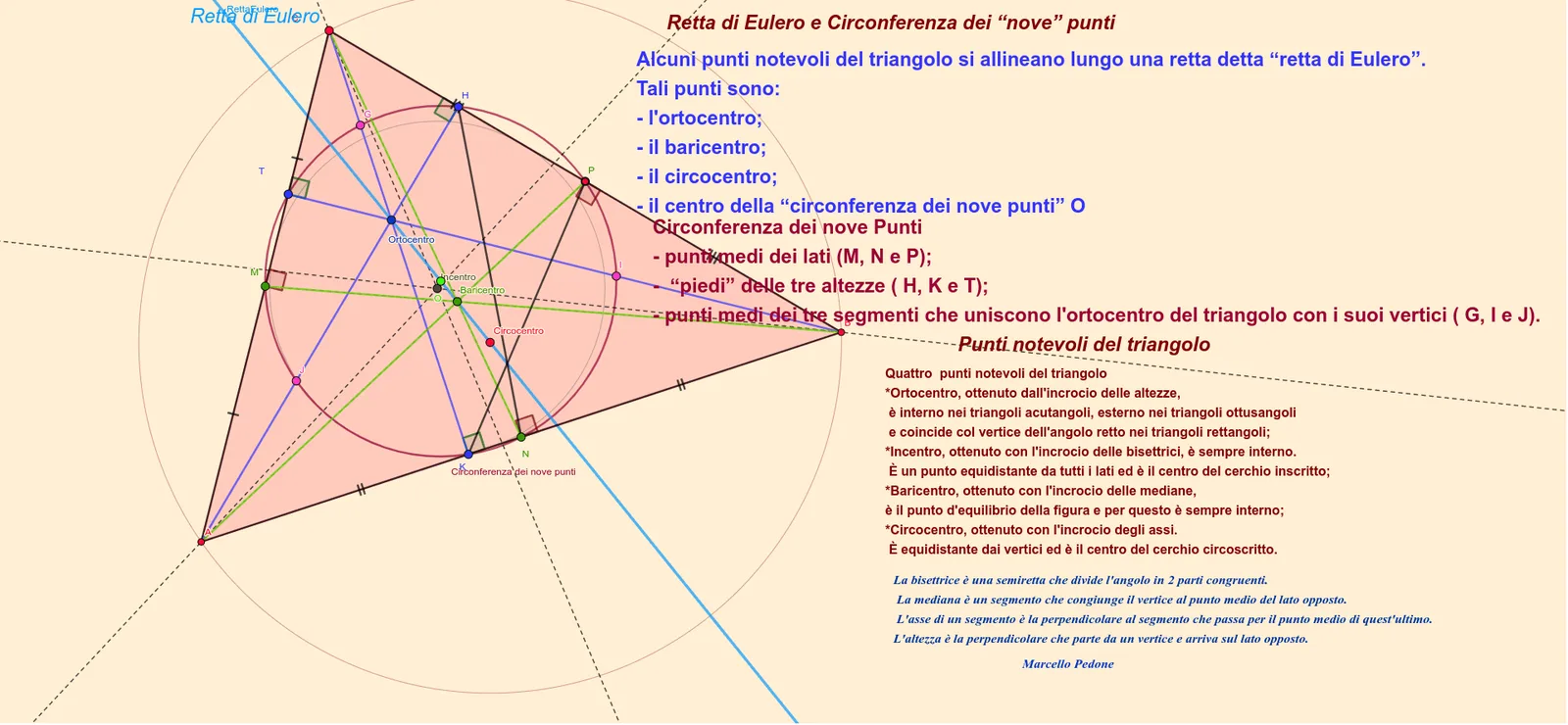
This example demonstrates a key, invariant relationship in triangle geometry: the Euler line configuration (linking centroid, orthocenter, and circumcenter) and the nine-point circle defined by notable midpoint/foot-of-altitude points. It builds and visualizes how these triangle centers and circle properties persist under the triangle’s geometric configuration. Core concepts include the Euler line, the nine-point circle, and classical triangle centers such as centroid, orthocenter, incenter, and circumcenter, along with the construction of right-angle projections and midpoints that generate the nine-point set. In GeoGebra, the construction relies on commands such as Intersect and Circle to create intersection results and circles; OrthogonalLine to draw altitudes/perpendiculars; Angle and AngularBisector for angle-related constraints; Midpoint to obtain midpoints; and Line, Segment, Polygon to represent the triangle and associated lines/edges. It also uses Center and Point to locate circle centers and key constructed points (e.g., Baricentro, Ortocentro, Incentro, Circocentro), with additional object handling (e.g., Conic) to support the geometric depiction. Suitable for high-school to early-university learners and for interactive lessons on triangle centers, invariant circle geometry, and rigorous geometric construction.
GeoGebra Commands & Parameters
Intersect(yAxis, xAxis) → APolygon(A, B, C) → t1, c, a_1, b_1OrthogonalLine(A, a_1) → fOrthogonalLine(B, b_1) → gOrthogonalLine(C, c) → hIntersect(h, g) → OrtocentroIntersect(f, a_1) → HIntersect(h, c) → KIntersect(b_1, g) → TAngle(B, K, C) → αAngle(C, H, A) → βAngle(B, T, C) → γMidpoint(C, B) → PMidpoint(B, A) → NMidpoint(C, A) → MSegment(P, A) → iSegment(C, N) → jSegment(B, M) → kIntersect(i, t1) → D, D_1Intersect(k, j) → BaricentroAngularBisector(A, C, B) → lAngularBisector(B, A, C) → mAngularBisector(C, B, A) → nIntersect(m, n) → IncentroOrthogonalLine(Incentro, b_1) → pIntersect(p, b_1) → ECircle(Incentro, E) → dOrthogonalLine(P, a_1) → qOrthogonalLine(M, b_1) → rOrthogonalLine(N, c) → sIntersect(r, q) → CircocentroAngle(Circocentro, M, C) → δAngle(B, N, Circocentro) → εPoint(q) → FAngle(F, P, B) → ζCircle(Circocentro, A) → eConic(M, H, P, N, K) → tMidpoint(C, Ortocentro) → GMidpoint(Ortocentro, B) → IMidpoint(Ortocentro, A) → JLine(Ortocentro, Baricentro) → RettaEuleroCenter(t) → OSegment(C, M) → f_1Segment(M, A) → g_1Segment(A, N) → h_1Segment(N, B) → i_1Segment(C, P) → j_1Segment(P, B) → k_1Segment(C, K) → l_1Segment(H, A) → m_1Segment(B, T) → n_1Segment(C, N) → p_1Segment(P, A) → q_1Segment(M, B) → r_1Segment(P, K) → s_1Segment(N, H) → t_1Intersect(a_1, k_1) → LIntersect(r, a_1) → QSegment(M, Q) → c_1Point(t) → RPoint(RettaEulero) → S
AI Drawing Prompt Reference
Construct a triangle with vertices A, B, and C on a coordinate plane. Drop the three altitudes as perpendicular lines from each vertex to the opposite side; their pairwise intersections determine the orthocenter. Compute the midpoints of CB, BA, and CA, forming the nine-point configuration base points P, N, and M. Use perpendicular-line intersections based on these points to locate the point E, then draw a circle using the already determined incenter-related circle center with E to represent the nine-point circle. Also create the centroid (from midpoint relations) and the circumcenter from the constructed perpendiculars. Draw the Euler line by connecting the orthocenter and centroid. Include the key angle views defined by lines from the circle centers to the notable midpoint points, and depict the final nine-point set via a smooth conic passing through the constructed special points.
The prompt above was compiled from the original drawing commands and is for reference only.