
Goras Circle Tangency Demonstration
Loading the math board and drawing, please wait…
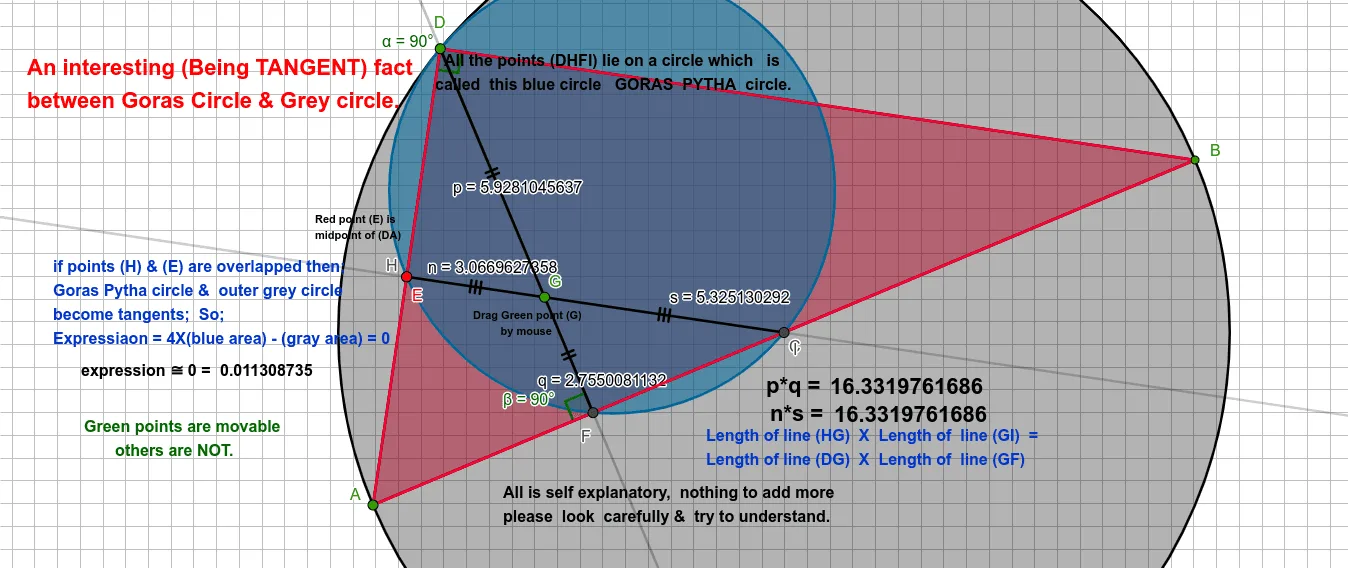
This example demonstrates the geometric property of tangency between the Goras circle and triangle sides. The Goras circle is an important concept in triangle geometry with unique mathematical beauty in its tangent relationships. Construction key points: ①Use Midpoint command to find midpoints of triangle ABC sides; ②Construct Goras circle using Circle command; ③Draw tangents using Tangent command; ④Apply Angle and Polygon tools for angle measurement and shape analysis; ⑤Complete precise geometric construction with Segment, OrthogonalLine, Intersect commands. This example is suitable for high school mathematics courses covering 'circle and line relationships' and 'properties of tangents', also excellent for geometry competition training to help students deeply understand geometric principles of circle tangency.
GeoGebra Commands & Parameters
Midpoint(A, B) → CCircle(C, B) → cArea(c) → areacPoint(c) → DSegment(D, B) → iSegment(D, A) → hSegment(A, B) → fOrthogonalLine(D, f) → jIntersect(j, f) → FSegment(D, F) → kPoint(k) → GLine(G, i) → lIntersect(l, f) → IIntersect(l, h) → HCircle(D, H, I) → eArea(e) → areaeLineBisector(f) → gAngle(A, D, B) → αAngle(D, F, A) → βSegment(H, G) → nSegment(D, G) → pSegment(G, F) → qSegment(G, I) → sSegment(D, A) → mPolygon(D, A, B) → t1, b_1, d_1, a_1Midpoint(D, A) → E
AI Drawing Prompt Reference
Draw a triangle with its three vertices, then construct midpoints of its sides and use them to define the Goras circle. Build the key tangency configuration by drawing a line through the circle’s key point that is perpendicular to one side, intersecting it with the side to obtain a point used as the tangency reference. Connect the circle’s key point to the relevant intersection points to form the needed segments, and use the formed points and lines to measure two angles associated with the tangency setup. Finally, outline a polygon region using the same key points and include an additional midpoint as an auxiliary construction to clearly demonstrate the tangency relationships between the circle and the triangle sides.
The prompt above was compiled from the original drawing commands and is for reference only.