
Subtraction of Algebraic Expressions: Interactive Practice
Loading the math board and drawing, please wait…
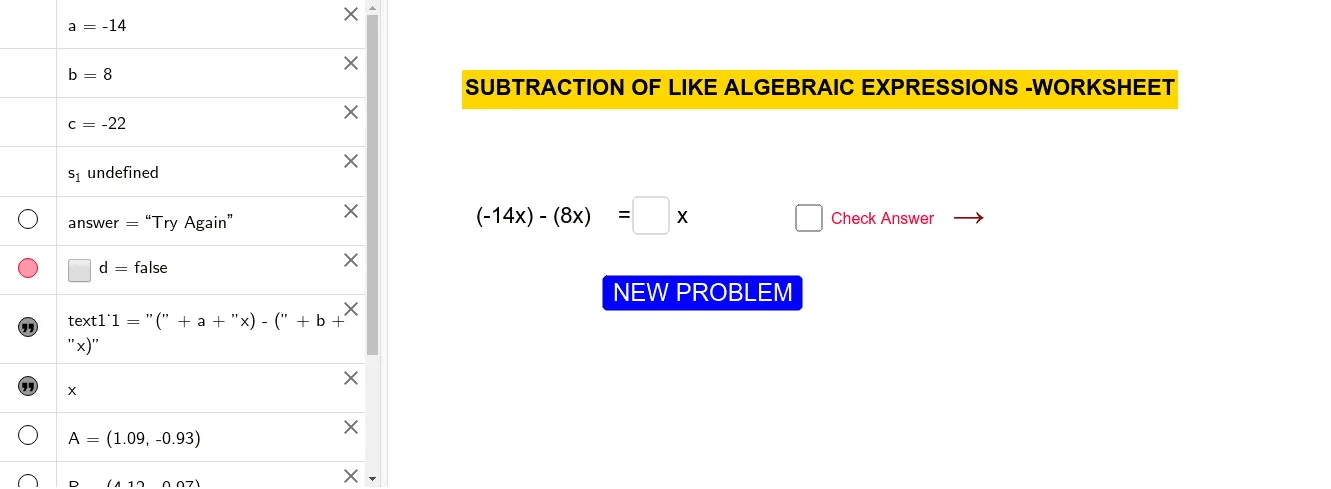
① This example demonstrates the subtraction of algebraic expressions (including variable terms and constants) through randomly generated problems with immediate feedback, helping learners master removing parentheses and combining like terms. ② The core mathematical concept is subtraction of polynomials, involving sign handling (subtracting an expression is equivalent to adding its opposite) and combining like terms. ③ Construction highlights: GeoGebra commands Random, Textfield, and If are used; objects include a, b, c, s_1, InputBox1, button1, answer, d, text1_1, text1, A, B, text2, text3, forming a complete interactive practice interface. ④ Suitable for middle school algebra teaching and self-study, useful for classroom demonstrations or after-class practice, reinforcing rules through immediate feedback.
GeoGebra Commands & Parameters
Random(-25, 25) → aRandom(-25, 25) → bTextfield(s_1) → InputBox1If(s_1 ≟ c, "Weldone", "Try Again") → answer
AI Drawing Prompt Reference
Create an interactive practice interface for subtracting algebraic expressions. The center displays a randomly generated subtraction problem with two polynomials, each containing variable terms and constants with random integer coefficients. Below the problem, there is an input box for the user's answer. Next to the input box, a feedback area shows 'Weldone' for correct answers and 'Try Again' for incorrect ones. The layout is clean and suitable for teaching, with a light background, dark text, and highlighted problem and input areas.
The prompt above was compiled from the original drawing commands and is for reference only.