
String Sphere: Icosahedron and Spherical Chord Network
Loading the math board and drawing, please wait…
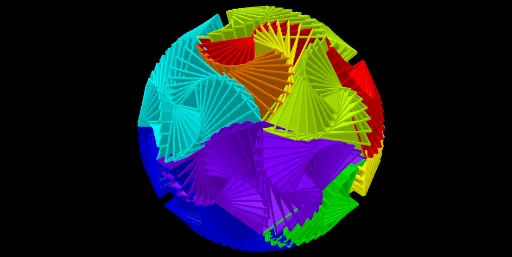
① This example demonstrates how to construct a network of chords on a sphere by projecting the edges of a regular icosahedron onto the sphere's surface, creating a visually striking 'string sphere'. ② Core mathematical concepts include regular icosahedron geometry, spherical geometry, midpoints, plane intersections, rotations and reflections, along with related topics like exponential functions and linear programming as tagged. ③ Construction highlights: using GeoGebra commands such as Point, Icosahedron, Midpoint, Sphere, PointIn, OrthogonalLine, Plane, Intersect, Angle, Sequence, Rotate, and Mirror to define faces (e.g., faceABC, faceACF) and edges (e.g., areteAC, areteAB), then generating chords via midpoints, orthogonal lines, and plane intersections. ④ Suitable for high school or college students studying solid geometry, spatial reasoning, and advanced GeoGebra usage, as well as for mathematical art projects.
GeoGebra Commands & Parameters
Point(Circle[Midpoint[A, B], (Distance[A, B] * sqrt(3) / 2), Segment[A, B]]) → CIcosahedron(A, B, C) → a, D, faceABC, faceACF, faceAFG, faceADG, faceABD, faceBDH, faceBEH, faceBCE, faceCEI, faceCFI, E, faceEHK, faceEIK, faceIKL, faceFIL, faceHJK, faceJKL, faceGJL, faceFGL, faceDHJ, faceDGJ, F, areteAC, areteAB, areteBC, areteAF, areteCF, areteAG, areteFG, areteAD, areteDG, areteBD, G, areteBH, areteDH, areteBE, areteEH, areteCE, areteCI, areteEI, areteFI, areteEK, areteHK, H, areteIK, areteIL, areteKL, areteFL, areteJK, areteHJ, areteJL, areteGL, areteGJ, areteDJ, I, J, K, LMidpoint(D, I) → MSphere(M, A) → bPointIn(b) → POrthogonalLine(M, xOyPlane) → fPlane(J, f) → cOrthogonalLine(M, c) → gIntersect(f, b) → N, OAngle(P, M, O) → αSequence(Rotate[Rotate[J, (-a), g], (3 * a), f], a, 0, α, α / 9) → L_1Rotate(L_1, (2 * π / 3), f) → L_2Sequence(Polygon[M, Element[L_1, i], Element[L_2, i]], i, 1, Length[L_1], n) → L_3Rotate(L_3, (2 * π / 3), f) → L_4Rotate(L_3, (-2 * π / 3), f) → L_5Sequence(Rotate[{L_3, L_4, L_5}, ((a * 2) * π / 5), Line[M, J]], a, 1, 4) → L_6Sequence(Rotate[{L_3, L_4, L_5}, ((a * 2) * π / 5), Line[M, K]], a, 2, 4) → L_7Mirror(L_6, M) → L_8Sequence(Rotate[{L_3, L_4, L_5}, ((a * 2) * π / 5), Line[M, L]], a, 2, 3) → L_9Mirror(L_9, M) → L_{10}Rotate({L_3, L_4, L_5}, (4 * π / 5), Line[M, J]) → L_{11}Rotate(L_{11}, (4 * π / 5), Line[M, D]) → L_{12}Rotate(L_{11}, (2 * π / 5), Line[M, D]) → L_{13}Rotate(L_{11}, (6 * π / 5), Line[M, G]) → L_{14}Rotate(L_{12}, (-2 * π / 5), Line[M, A]) → L_{15}
AI Drawing Prompt Reference
Draw a 'string sphere' by projecting the edges of a regular icosahedron onto a sphere's surface to form a network of chords. Start by creating the icosahedron, then identify its vertices and faces. Use midpoints, orthogonal lines, and plane intersections to generate the chords. Finally, apply rotation and reflection operations to create the entire chord network, forming a visually striking spherical structure.
The prompt above was compiled from the original drawing commands and is for reference only.