
Strange Cylinder
Loading the math board and drawing, please wait…
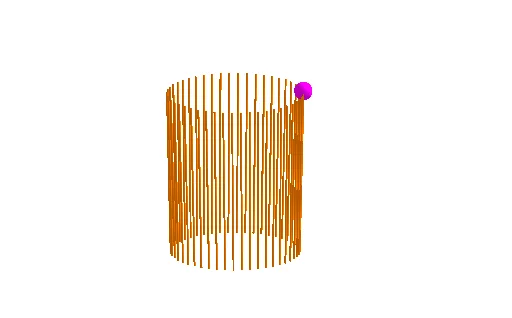
This example demonstrates the construction of a strange cylinder using fractal geometry and rotation. It involves core mathematical concepts such as cylinder formation, fractals, rotation, optimization problems, and linear programming. The construction utilizes GeoGebra commands like Intersect, Sequence, and Circle, with objects including points A, L, c, B, and lines L1, L2, L3. It is suitable for high school and above students to understand complex geometric constructions and optimization problems.
GeoGebra Commands & Parameters
Intersect(yAxis, xAxis) → ASequence(Rotate[(1, 0, 0), ((a * 2) * π / 48)], a, 1, 48) → LCircle(A, 1, zAxis) → cSequence(Rotate[B, ((a * 2) * π / 48)], a, 1, 48) → L1Sequence(Mirror[Element[L1, i], Element[L, i]], i, 1, 48) → L2Sequence(Segment[Element[L1, i], Element[L2, i]], i, 1, 48) → L3
AI Drawing Prompt Reference
Draw a strange cylinder constructed using fractal geometry and rotation, start by creating a unit circle at the origin along the x-axis, then generate 48 rays distributed evenly in angles, rotate these rays around the y-axis 48 times to form a helix, draw another unit circle centered at the origin, rotate the helix around the z-axis 48 times, and finally connect corresponding points of the two sets of helices with symmetrical line segments to form a complex 3D structure.
The prompt above was compiled from the original drawing commands and is for reference only.