
Stereographic Projection: Circles to Circles
Loading the math board and drawing, please wait…
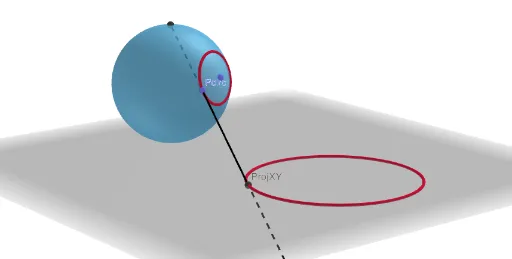
This example demonstrates how stereographic projection maps circles on a sphere to circles on a plane. The core mathematical concepts involved include spherical geometry, projection transformations, and analytical geometry. The construction utilizes GeoGebra commands such as Sphere, OrthogonalPlane, PointIn, Segment, Point, IntersectPath, Ray, Intersect, OrthogonalLine, Polygon, Locus, and Angle, along with objects like button1, center, radius, sph, P, topPlane, Psph, s, AuxP, TangPAux, TangPsph, circleSph, Pcirc, Proj, TangPcirc, ProjXY, AuxPerp, segaux, PAux, t1, segaux2, PAux2, t2, T1, pcirc, p, paux, T2, f, g, h, Prj, angleT1, angleT2, a, b, angleT3, angleT4, c. It is suitable for high school and above students studying spherical projection and analytical geometry.
GeoGebra Commands & Parameters
Sphere((0, 0, center), radius) → sphOrthogonalPlane(P, zAxis) → topPlanePointIn(sph) → PsphSegment((0, 0, center), Psph) → sPoint(s) → AuxPOrthogonalPlane(AuxP, s) → TangPAuxOrthogonalPlane(Psph, s) → TangPsphIntersectPath(TangPAux, sph) → circleSphPoint(circleSph) → PcircRay(P, Pcirc) → ProjOrthogonalPlane(Pcirc, Segment[(0, 0, center), Pcirc]) → TangPcircIntersect(Proj, xOyPlane) → ProjXYOrthogonalLine(ProjXY, xOyPlane) → AuxPerpRay(P, Intersect[AuxPerp, topPlane]) → segauxIntersect(segaux, TangPcirc) → PAuxSegment(PAux, Pcirc) → t1Ray((0, 0, 0), ProjXY) → segaux2Intersect(segaux2, TangPcirc) → PAux2Segment(PAux2, Pcirc) → t2Polygon(P, PAux, Pcirc) → T1, pcirc, p, pauxPolygon(ProjXY, PAux2, Pcirc) → T2, f, g, hLocus(ProjXY, Pcirc) → PrjAngle(Pcirc, PAux, P) → angleT1Angle(Pcirc, PAux2, ProjXY) → angleT2Angle(Pcirc, P, PAux) → angleT3Angle(PAux2, ProjXY, Pcirc) → angleT4