
Steps for Finding Resultant Vectors
Loading the math board and drawing, please wait…
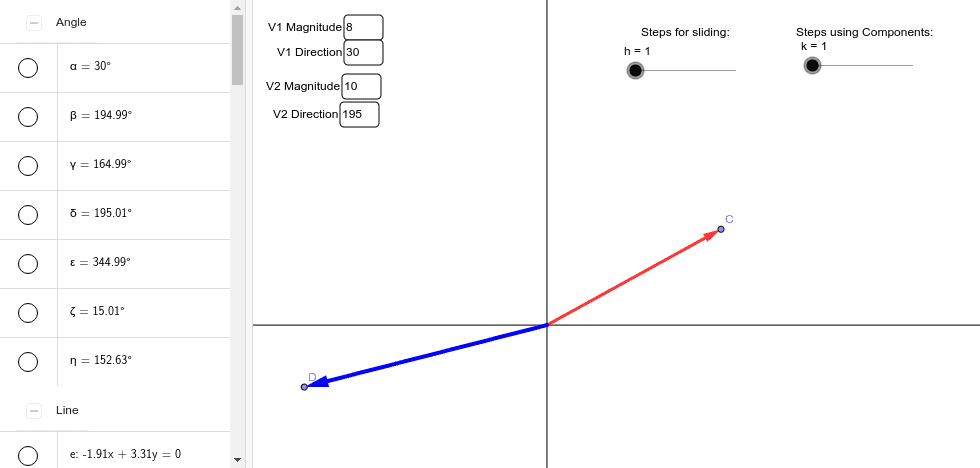
① This applet demonstrates the complete procedure for obtaining a resultant vector from two given vectors' magnitudes and directions using the parallelogram or triangle law. ② Core mathematical concepts include vector addition, resultant vectors, the Law of Sines, the Law of Cosines, and vector rotation and translation. ③ Construction highlights: Vector creates the vectors; Rotate and Translate perform rotation and translation; Angle measures the included angle; Intersect, Line, Segment, and Point build the parallelogram; Textfield provides parameter input. ④ Suitable for high‑school physics/mathematics vector lessons and as a supplemental tool for introductory university mechanics courses.
GeoGebra Commands & Parameters
Textfield(a) → inputBox1Textfield(b) → inputBox2Textfield(c) → inputBox3Textfield(d) → inputBox4Point(xAxis) → AIntersect(xAxis, yAxis) → BRotate(A, b / 57.3, B) → A'Angle(A, B, A') → αRotate(A, d / 57.3, B) → A'_1Angle(A, B, A'_1) → βLine(B, A') → eLine(B, A'_1) → fSegment(B, C) → gVector(B, C) → uVector(B, D) → vTranslate(B, w) → B'Angle(C, E, D) → γAngle(D, E, C) → δTranslate(C, v) → C'Vector(D, C') → zVector(E, C') → iAngle(C', D, E) → εAngle(E, D, C') → ζAngle(A, E, C') → ηSegment(E, C') → jPoint(i) → GPoint(z) → ILine(A, E) → lPoint(yAxis) → JLine(J, E) → m