
Step 5: Rotating a Triangle-Based Design to Create a Tessellation
Loading the math board and drawing, please wait…
In collections
Create a Rotation Tessellation using a Triangle
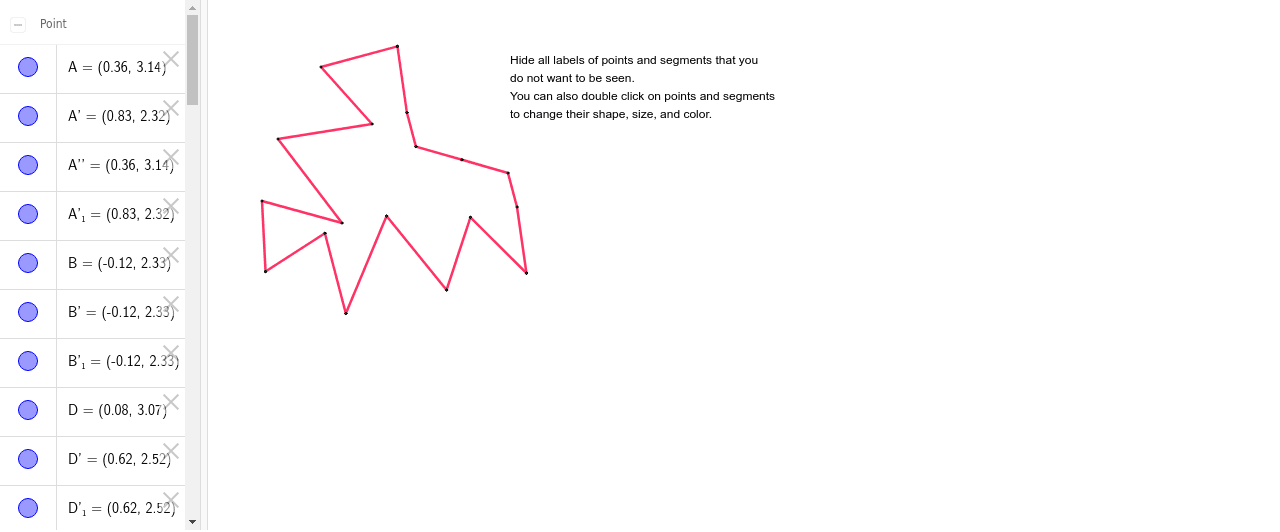
① This example demonstrates how to rotate a design based on a triangle to generate a tessellation pattern. ② The core mathematical concepts include rotation transformation, triangle similarity, and using rotational symmetry to construct a plane tiling. ③ Construction highlights: from the construction summary, the GeoGebra commands used are Polygon, Segment, Rotate, and Midpoint, creating multiple triangles and their rotated copies, with auxiliary objects like midpoints and segments to progressively build the full tessellation. ④ Suitable for middle or high school geometry classes, or as an introduction to transformational geometry and tessellation in art or computer-aided design.
GeoGebra Commands & Parameters
Polygon(A, B, 3) → poly1, a, b, c, CSegment(A, D) → dSegment(D, E) → eSegment(E, F) → fSegment(F, G) → gSegment(G, H) → hSegment(H, B) → iRotate(A, -60*°, B) → A'Rotate(B, -60*°, B) → B'Segment(A', B') → a'Rotate(A, -60*°, B) → A'_1Rotate(D, -60*°, B) → D'Segment(A'_1, D') → d'Rotate(D, -60*°, B) → D'_1Rotate(E, -60*°, B) → E'Segment(D'_1, E') → e'Rotate(E, -60*°, B) → E'_1Rotate(F, -60*°, B) → F'Segment(E'_1, F') → f'Rotate(F, -60*°, B) → F'_1Rotate(G, -60*°, B) → G'Segment(F'_1, G') → g'Rotate(G, -60*°, B) → G'_1Rotate(H, -60*°, B) → H'Segment(G'_1, H') → h'Rotate(H, -60*°, B) → H'_1Rotate(B, -60*°, B) → B'_1Segment(H'_1, B'_1) → i'Midpoint(c) → ISegment(C, J) → jSegment(J, K) → kSegment(K, I) → lRotate(A'_1, -180*°, I) → LRotate(C, -180*°, I) → C'Rotate(J, -180*°, I) → J'Segment(C', J') → j'Rotate(J, -180*°, I) → J'_1Rotate(K, -180*°, I) → K'Segment(J'_1, K') → k'Rotate(K, -180*°, I) → K'_1Rotate(I, -180*°, I) → I'Segment(K'_1, I') → l'Rotate(A', -180*°, I) → A''
AI Drawing Prompt Reference
Draw a rotating design based on a triangle to create a tessellation pattern. Start by sketching a triangle, then rotate it 60 degrees around one vertex and continue rotating to form multiple triangles. Use rotational symmetry to build the complete plane tiling, marking midpoints and auxiliary segments along the way to construct the intricate geometric pattern.
The prompt above was compiled from the original drawing commands and is for reference only.