
Create Tessellation Based on Triangle Rotation
Loading the math board and drawing, please wait…
In collections
Create a Rotation Tessellation using a Triangle
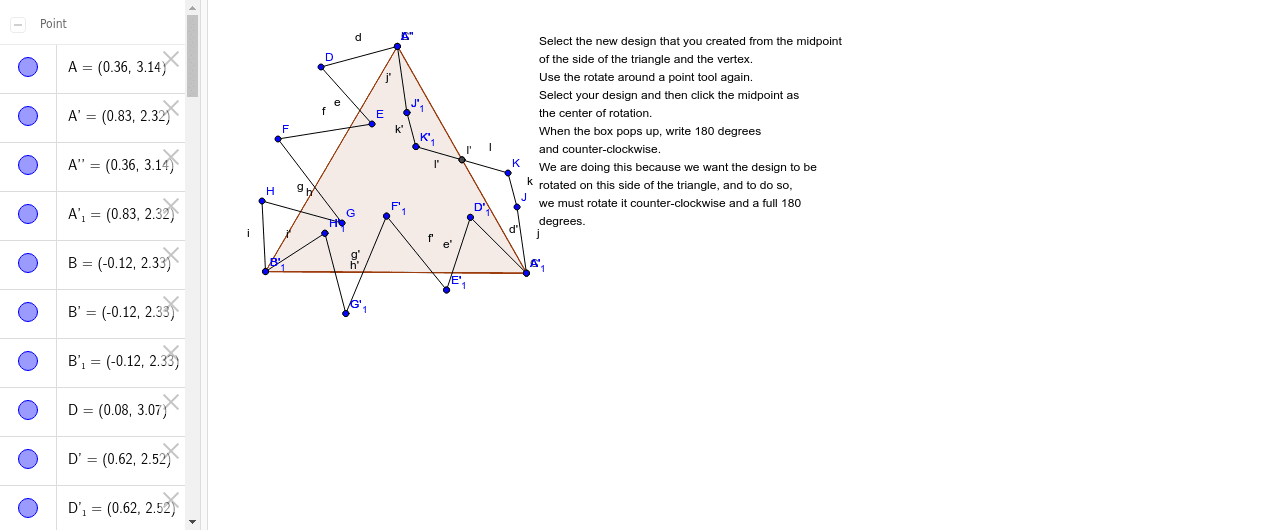
This example demonstrates how to create a tessellation based on triangle rotation. Key mathematical concepts include rotation, geometric transformations, and geometric construction. Using GeoGebra commands such as Polygon, Segment, Rotate, and Midpoint, a series of rotated triangles are constructed to form a beautiful tessellation pattern. Suitable for middle school and above students to learn about geometric transformations and tessellations.
GeoGebra Commands & Parameters
Polygon(A, B, 3) → poly1, a, b, c, CSegment(A, D) → dSegment(D, E) → eSegment(E, F) → fSegment(F, G) → gSegment(G, H) → hSegment(H, B) → iRotate(A, -60*°, B) → A'Rotate(B, -60*°, B) → B'Segment(A', B') → a'Rotate(A, -60*°, B) → A'_1Rotate(D, -60*°, B) → D'Segment(A'_1, D') → d'Rotate(D, -60*°, B) → D'_1Rotate(E, -60*°, B) → E'Segment(D'_1, E') → e'Rotate(E, -60*°, B) → E'_1Rotate(F, -60*°, B) → F'Segment(E'_1, F') → f'Rotate(F, -60*°, B) → F'_1Rotate(G, -60*°, B) → G'Segment(F'_1, G') → g'Rotate(G, -60*°, B) → G'_1Rotate(H, -60*°, B) → H'Segment(G'_1, H') → h'Rotate(H, -60*°, B) → H'_1Rotate(B, -60*°, B) → B'_1Segment(H'_1, B'_1) → i'Midpoint(c) → ISegment(C, J) → jSegment(J, K) → kSegment(K, I) → lRotate(A'_1, -180*°, I) → LRotate(C, -180*°, I) → C'Rotate(J, -180*°, I) → J'Segment(C', J') → j'Rotate(J, -180*°, I) → J'_1Rotate(K, -180*°, I) → K'Segment(J'_1, K') → k'Rotate(K, -180*°, I) → K'_1Rotate(I, -180*°, I) → I'Segment(K'_1, I') → l'Rotate(A', -180*°, I) → A''