
Square Tessellation Design
Loading the math board and drawing, please wait…
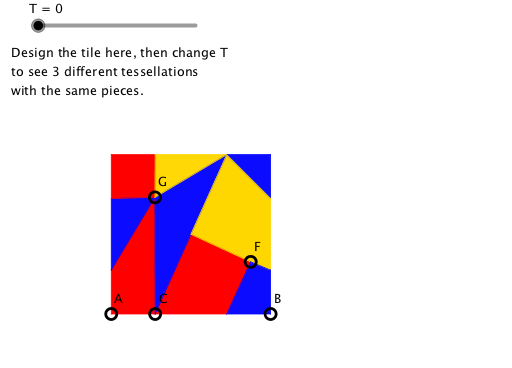
This applet designs a square and fills the plane in three different ways to help students identify the transformations in each. It uses commands like Rotate, Mirror, and Translate, suitable for middle school and above students for geometric construction practice.
GeoGebra Commands & Parameters
Rotate(B, 90°, A) → B'Rotate(A, 90°, B') → A'Point(Segment[A, B]) → CLineBisector(A, B) → fLineBisector(B, A') → gMirror(C, f) → C'Mirror(C', g) → C''Mirror(C'', f) → C'''Intersect(f, g) → DRotate(C, 90°, D) → E'''Mirror(E''', g) → EMirror(E, f) → E'Mirror(E', g) → E''PointIn(Polygon[A, B, A', B']) → FPointIn(Polygon[A, B, A', B']) → GPolygon(C, A, E'', G) → poly1, c, a, e'', g_1Polygon(C, C', F, D) → poly2, c_1, c', f_1, dPolygon(C, D, C'', G) → poly3, c_2, d_1, c'', g_2Polygon(E', G, E'') → poly4, e''_1, e', g_3Polygon(E', B', C''', G) → poly5, e'_1, b', c''', g_4Polygon(G, C''', C'') → poly6, c''_1, g_5, c'''_1Polygon(C'', E, A') → poly7, a', c''_2, ePolygon(E, E''', F, D, C'') → poly8, e_1, e''', f_2, d_2, c''_3Polygon(E''', B, C', F) → poly9, e'''_1, b, c'_1, f_3Vector(A, B) → uVector(A, B') → vSequence(Sequence[Translate[list2, Vector[(i * u) + (j * v)]], i, (-N), N], j, (-N), N) → list4Sequence(Sequence[Translate[list1, Vector[(i * u) + (j * v)]], i, (-N), N], j, (-N), N) → list5Sequence(Sequence[Translate[list3, Vector[(i * u) + (j * v)]], i, (-N), N], j, (-N), N) → list6Midpoint(A, B) → HMidpoint(A', B) → IRotate(list1, 180°, I) → list1'Rotate(list1, 180°, H) → list1'_1Midpoint(A', B) → JRotate(H, 90°, B) → H'Rotate(list1'_1, 180°, H') → list7Rotate(list2, 180°, I) → list2'Rotate(list2, 180°, H) → list2'_1Rotate(list2'_1, 180°, H') → list8Rotate(list3, 180°, I) → list3'Rotate(list3, 180°, H) → list3'_1Rotate(list3'_1, 180°, H') → list9Sequence(Sequence[Translate[{list2, list2', list2'_1, list8}, Vector[((2 * i) * u) + ((2 * j) * v)]], i, (-N), N], j, (-N), N) → list10Sequence(Sequence[Translate[{list1, list1', list1'_1, list7}, Vector[((2 * i) * u) + ((2 * j) * v)]], i, (-N), N], j, (-N), N) → list11Sequence(Sequence[Translate[{list3, list3', list3'_1, list9}, Vector[((2 * i) * u) + ((2 * j) * v)]], i, (-N), N], j, (-N), N) → list12Translate(Mirror[list1, f], v) → list13Translate(Mirror[list2, f], v) → list14Translate(Mirror[list3, f], v) → list15Translate(Mirror[list1, g], u) → list16Translate(Mirror[list2, g], u) → list17Translate(Mirror[list3, g], u) → list18Translate(Mirror[list16, Translate[f, u]], v) → list19Translate(Mirror[list17, Translate[f, u]], v) → list20Translate(Mirror[list18, Translate[f, u]], v) → list21Sequence(Sequence[Translate[{list3, list18, list15, list21}, Vector[((2 * i) * u) + ((2 * j) * v)]], i, (-N), N], j, (-N), N) → list22Sequence(Sequence[Translate[{list2, list17, list14, list20}, Vector[((2 * i) * u) + ((2 * j) * v)]], i, (-N), N], j, (-N), N) → list23Sequence(Sequence[Translate[{list1, list16, list13, list19}, Vector[((2 * i) * u) + ((2 * j) * v)]], i, (-N), N], j, (-N), N) → list24
AI Drawing Prompt Reference
Draw a square and fill the plane using three different methods: rotation by 90 degrees, reflection, and translation. Start by rotating one side's midpoint by 90 degrees to create a new point, then reflect this point over the perpendicular bisector of the side and translate it to generate multiple squares. Arrange these squares in different sequences to form three distinct tessellation patterns.
The prompt above was compiled from the original drawing commands and is for reference only.