
Square Roots in Spiral vs Function
Loading the math board and drawing, please wait…
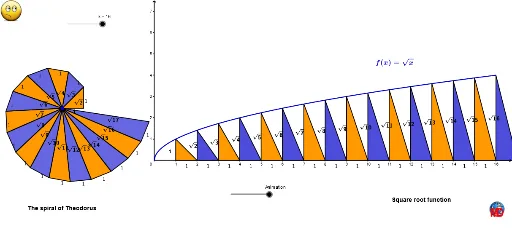
This example demonstrates how square roots are represented in a spiral and a function. Key mathematical concepts include square roots, functions, and geometric construction. Using commands like Polygon, Sequence, Function, and Midpoint in GeoGebra, a series of geometric shapes and function graphs are constructed. Suitable for high school mathematics education, particularly in the areas of coordinate geometry and function graphs.
GeoGebra Commands & Parameters
Polygon(A, B, C) → t1, c, a, bSequence(Angle[Rotate[(0, 0), -1.5708, Element[points, n]], Element[points, n], (0, 0)], n, 1, k) → L_2Take(points, 1, k + 1) → liste2Sequence(Polygon[A, Element[points, n], Element[points, n + 1]], n, 1, k) → strisSequence(Text[("\sqrt" * (n + 1)), Midpoint[A, Element[points, n + 1]], true, true], n, 1, k) → liste1Sequence((i, 0), i, 1, Length[points]) → liste3Sequence(Vector[Element[liste2, i], Element[liste3, i]], i, 1, Length[liste2]) → vect1Sequence(Translate[Element[liste2, i], Vector[(r * Element[vect1, i])]], i, 1, Length[liste2]) → liste5Sequence((i, f(i)), i, 1, Length[liste2]) → liste6Sequence(Vector[A, Element[liste6, i]], i, 1, Length[liste2]) → vect2Sequence(Translate[A, Vector[(r * Element[vect2, i])]], i, 1, Length[liste2]) → liste4Sequence(Polygon[Element[liste5, i], Element[liste5, i + 1], Element[liste4, i]], i, 1, Length[liste2]) → liste7Function(f, 0, k) → gMidpoint(A, B) → DTake(liste4, 1, k) → liste8Sequence(Polygon[Element[liste5, i], Element[liste5, i + 1], Element[liste4, i]], i, 1, Length[liste2], 2) → liste9Sequence(Polygon[Element[liste5, i], Element[liste5, i + 1], Element[liste4, i]], i, 1, Length[liste2]) → liste10Sequence(Polygon[A, Element[points, n], Element[points, n + 1]], n, 1, k, 2) → liste11Sequence(Polygon[A, Element[points, n], Element[points, n + 1]], n, 1, k) → liste12Sequence((0, 0) + (i, 0), i, 0, k) → l1Sequence((0, 0) + (i, sqrt(i)), i, 0, k) → l2Sequence(Midpoint[Element[l1, i], Element[l2, i]], i, 1, Length[l2]) → l4Sequence(Text["1", Midpoint[Element[points, n], Element[points, n + 1]], true, true], n, 1, k) → L_1Sequence(Text["1", Midpoint[Element[l1, n], Element[l1, n + 1] - (0.2, 0.2)], true, true], n, 2, k + 1) → l3Sequence(Text[("\sqrt" * n), Element[l4, n + 1] + (-0.45, 0.2), true, true], n, 2, k) → l5
AI Drawing Prompt Reference
Draw a spiral to demonstrate the geometric representation of square roots. Start by constructing a square, then rotate and connect its vertices to form a series of squares with side lengths increasing as the square roots of integers. Label each square with its side length and use different colors to distinguish them. Finally, plot the square root function on the same coordinate system to show its relationship with the spiral.
The prompt above was compiled from the original drawing commands and is for reference only.