
Square Cross Section: Step 6
Loading the math board and drawing, please wait…
In collections
Square Cross Sections
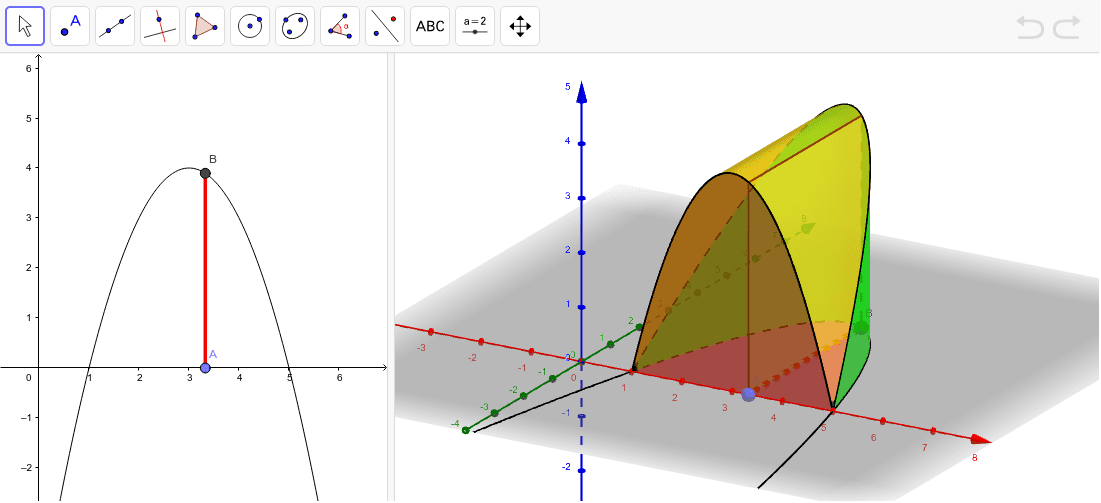
This example demonstrates the construction process of a square cross-section. Key mathematical concepts include parametric equations and solid geometry. Using GeoGebra commands such as Surface and CurveCartesian, a 3D representation of the square cross-section can be constructed. Suitable for high school mathematics education and learning.
GeoGebra Commands & Parameters
Root(f) → R1, R2Segment(R1, R2) → aPoint(a) → ASegment(A, B) → bPolygon(A, B, (x(B), y(B), y(B)), (x(A), y(A), y(B))) → poly1, a_1, b_1, c, dCurveCartesian(t, 0, f(t), t, 1, 5) → eCurveCartesian(t, f(t), f(t), t, 1, 5) → gSurface(u + ((1 - u) * t), (u * 0) + ((1 - u) * 0), (u * 0) + ((1 - u) * f(t)), u, 0, 1, t, 1, 5) → hSurface((u * t) + ((1 - u) * t), (u * 0) + ((1 - u) * f(t)), (u * f(t)) + ((1 - u) * f(t)), u, 0, 1, t, 1, 5) → iSurface((u * t) + ((1 - u) * t), (u * f(t)) + ((1 - u) * f(t)), (u * 0) + ((1 - u) * f(t)), u, 0, 1, t, 1, 5) → jSurface((u * t) + ((1 - u) * t), (u * 0) + ((1 - u) * f(t)), (u * 0) + ((1 - u) * 0), u, 0, 1, t, 1, 5) → k
AI Drawing Prompt Reference
Create a 3D visualization showing the construction of a square cross-section. Start by drawing a line segment, then mark a point on it and draw another line segment from this point. Use these two segments and their perpendiculars to form a square. Next, plot two curves connecting the diagonals of the square. Finally, generate three surfaces using parametric equations, extending from the square to create a solid shape.
The prompt above was compiled from the original drawing commands and is for reference only.