
Square Cross Section Solid Geometry Example
Loading the math board and drawing, please wait…
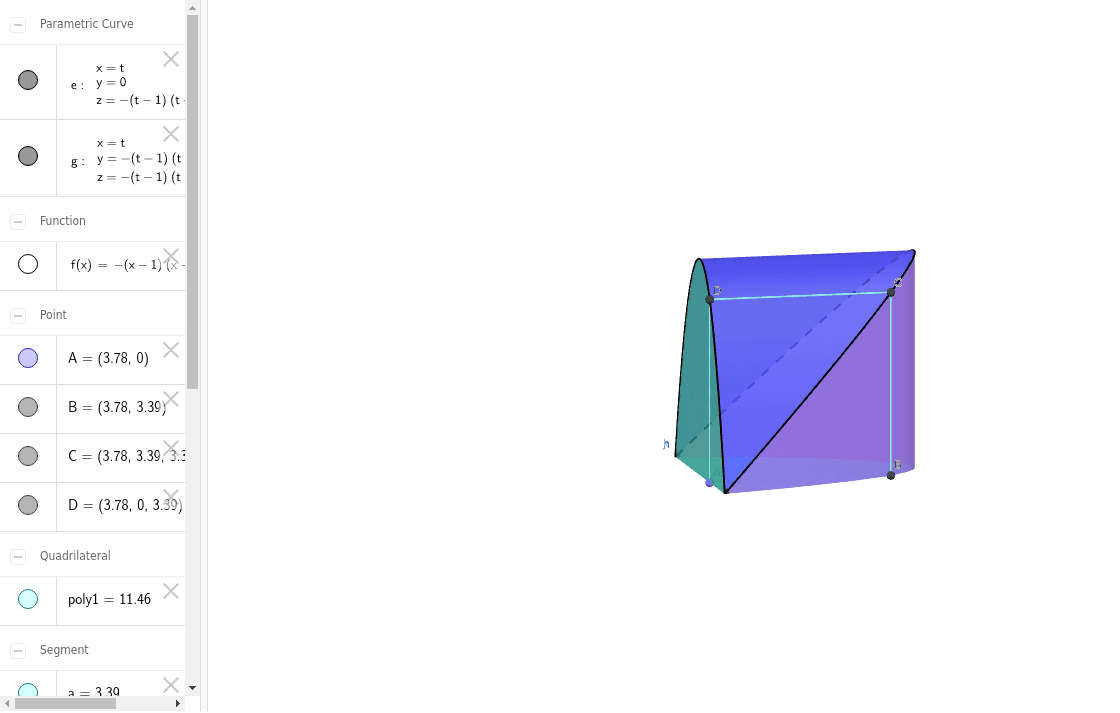
This example demonstrates a solid geometry figure with a square cross-section. The key mathematical concepts include solid geometry, volume calculation, and geometric construction. The construction involves GeoGebra commands such as Point, Polygon, CurveCartesian, and Surface, using objects like f, A, B, C, D, poly1, etc. It is suitable for middle or high school mathematics education to understand the relationship between solid shapes and their cross-sections.
GeoGebra Commands & Parameters
Point(Segment[(1, 0), (5, 0)]) → APolygon(A, B, C, D) → poly1, a, b, c, dCurveCartesian(t, 0, f(t), t, 1, 5) → eCurveCartesian(t, f(t), f(t), t, 1, 5) → gSurface((u * t) + ((1 - u) * t), (u * 0) + ((1 - u) * f(t)), (u * f(t)) + ((1 - u) * f(t)), t, 1, 5, u, 0, 1) → hSurface((u * t) + ((1 - u) * t), (u * 0) + ((1 - u) * 0), (u * 0) + ((1 - u) * f(t)), t, 1, 5, u, 0, 1) → iSurface((u * t) + ((1 - u) * t), (u * f(t)) + ((1 - u) * f(t)), (u * f(t)) + ((1 - u) * 0), t, 1, 5, u, 0, 1) → jSurface((u * t) + ((1 - u) * t), (u * 0) + ((1 - u) * f(t)), (u * 0) + ((1 - u) * 0), t, 1, 5, u, 0, 1) → k
AI Drawing Prompt Reference
Draw a solid geometry figure with a square cross-section. The figure consists of a square area and a curved surface. The curved surface forms a square in the cross-section. Construct by first drawing the square, then adding the curved surface, ensuring it aligns with the square in the cross-section. The figure should clearly show the relationship between the solid shape and its cross-section.
The prompt above was compiled from the original drawing commands and is for reference only.