
Naming Angles Practice: Identifying Angles in Geometric Figures
Loading the math board and drawing, please wait…
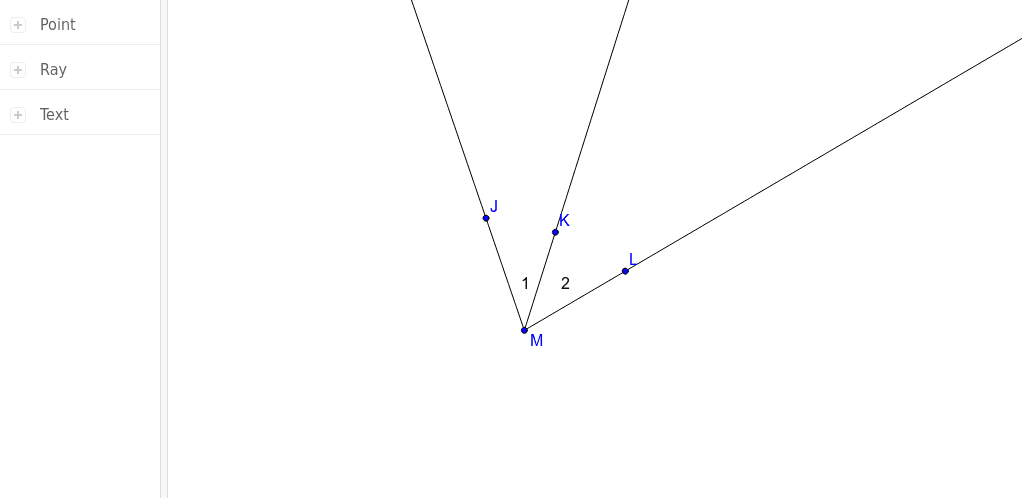
① This GeoGebra example demonstrates how to identify and name angles within various geometric figures such as triangles, rectangles, parabolas, and conic sections, providing an interactive practice environment. ② The core mathematical concept is the definition of an angle, its vertex and sides, and the standard notation using three points (e.g., ∠JML) or Greek letters, with rays serving as the fundamental building blocks of angle sides. ③ Construction details: The example uses the Ray command to create rays from points J, M, L, K, and constructs segments a, b, c along with text objects text1 and text2 to label angles, enabling dynamic exploration and self-assessment. ④ It is suitable for middle school geometry beginners, ideal for classroom exercises or independent review, helping students master angle naming conventions and spatial reasoning, and can also serve as a template for teachers to create customized practice materials.
GeoGebra Commands & Parameters
Ray(M, J) → aRay(M, L) → bRay(M, K) → c
AI Drawing Prompt Reference
Draw a triangle with point M as the vertex, connecting points J and L, and then draw two rays from point M to connect with point K and point L. Label the three angles as ∠JML, ∠KML, and ∠JMK.
The prompt above was compiled from the original drawing commands and is for reference only.