
Parabola Construction Again
Loading the math board and drawing, please wait…
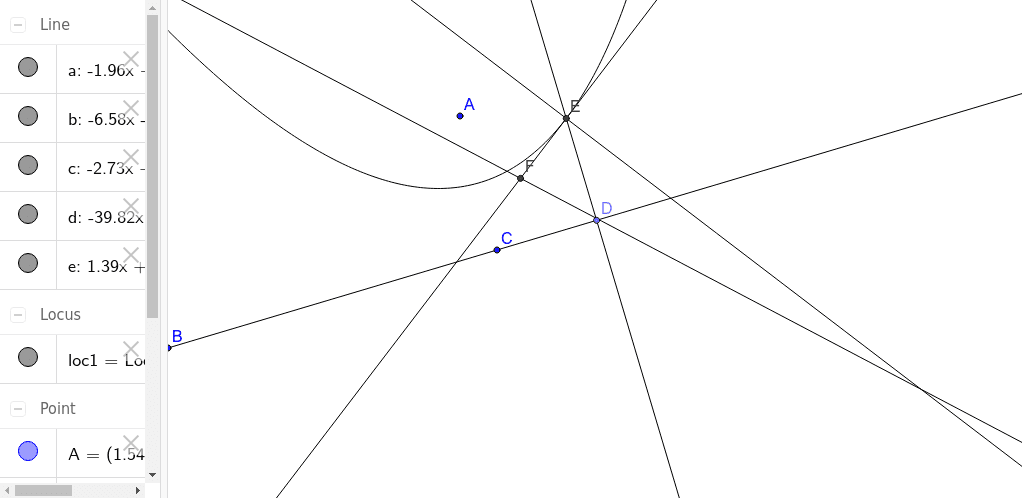
This example demonstrates an alternative geometric construction method for a parabola. It involves core mathematical concepts such as coordinate geometry, geometric transformations, locus, and equations. Key GeoGebra commands and objects used in the construction include Line, Point, OrthogonalLine, LineBisector, Intersect, and Locus. Suitable for high school students and educators for teaching demonstrations and deeper understanding of parabola properties.
GeoGebra Commands & Parameters
Line(B, C) → aPoint(a) → DOrthogonalLine(D, a) → bLineBisector(A, D) → cIntersect(b, c) → ELocus(E, D) → loc1OrthogonalLine(E, c) → dLineBisector(E, C) → eIntersect(c, e) → F
AI Drawing Prompt Reference
Draw a line segment and mark a point on it. Then, draw a line perpendicular to the segment through the point. Find the perpendicular bisector of the segment and determine the intersection of the perpendicular line and the bisector. From this intersection, draw a line perpendicular to the bisector, and find its intersection with the other segment. Finally, plot the locus of the point with the intersection and the starting point as parameters to demonstrate the construction of a parabola.
The prompt above was compiled from the original drawing commands and is for reference only.