
Square Cross Section of a Parabola
Loading the math board and drawing, please wait…
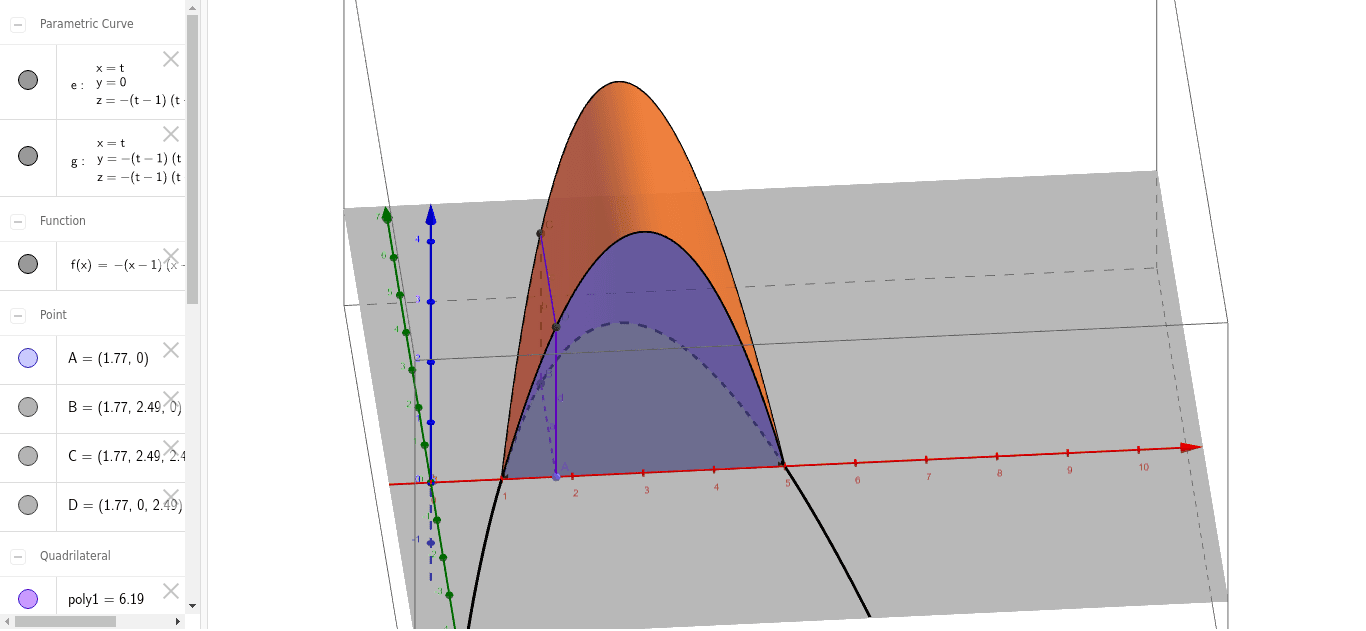
This example demonstrates the geometric construction of a square cross-section of a parabola. It involves core mathematical concepts such as parabolas, polygons, coordinate geometry, and geometric constructions. The construction uses GeoGebra commands like Point, Polygon, CurveCartesian, and Surface, with objects including f (function), A/B/C/D (points), poly1 (polygon), and variables a/b/c/d/e/g/h/i/j/k. It is suitable for high school and above students to learn and understand the relationship between parabolas and geometric cross-sections, and can be used for mathematical teaching demonstrations.
GeoGebra Commands & Parameters
Point(Segment[(1, 0), (5, 0)]) → APolygon(A, B, C, D) → poly1, a, b, c, dCurveCartesian(t, 0, f(t), t, 1, 5) → eCurveCartesian(t, f(t), f(t), t, 1, 5) → gSurface((u * t) + ((1 - u) * t), (u * 0) + ((1 - u) * f(t)), (u * f(t)) + ((1 - u) * f(t)), t, 1, 5, u, 0, 1) → hSurface((u * t) + ((1 - u) * t), (u * f(t)) + ((1 - u) * f(t)), (u * 0) + ((1 - u) * f(t)), t, 1, 5, u, 0, 1) → iSurface((u * t) + ((1 - u) * t), (u * 0) + ((1 - u) * f(t)), (u * 0) + ((1 - u) * 0), t, 1, 5, u, 0, 1) → jSurface((u * t) + ((1 - u) * t), (u * 0) + ((1 - u) * 0), (u * 0) + ((1 - u) * f(t)), t, 1, 5, u, 0, 1) → k
AI Drawing Prompt Reference
Draw a square cross-section of a parabola, showing the relationship between the parabola and geometric cross-sections. Start by drawing a horizontal line segment and construct a square based on it. Then, plot the parabola within a specified range and use parametric equations to generate multiple surfaces, demonstrating the integration of the square with the parabola, and finally present the complete geometric construction process.
The prompt above was compiled from the original drawing commands and is for reference only.