
Area Between Two Functions Rotated Around X-axis
Loading the math board and drawing, please wait…
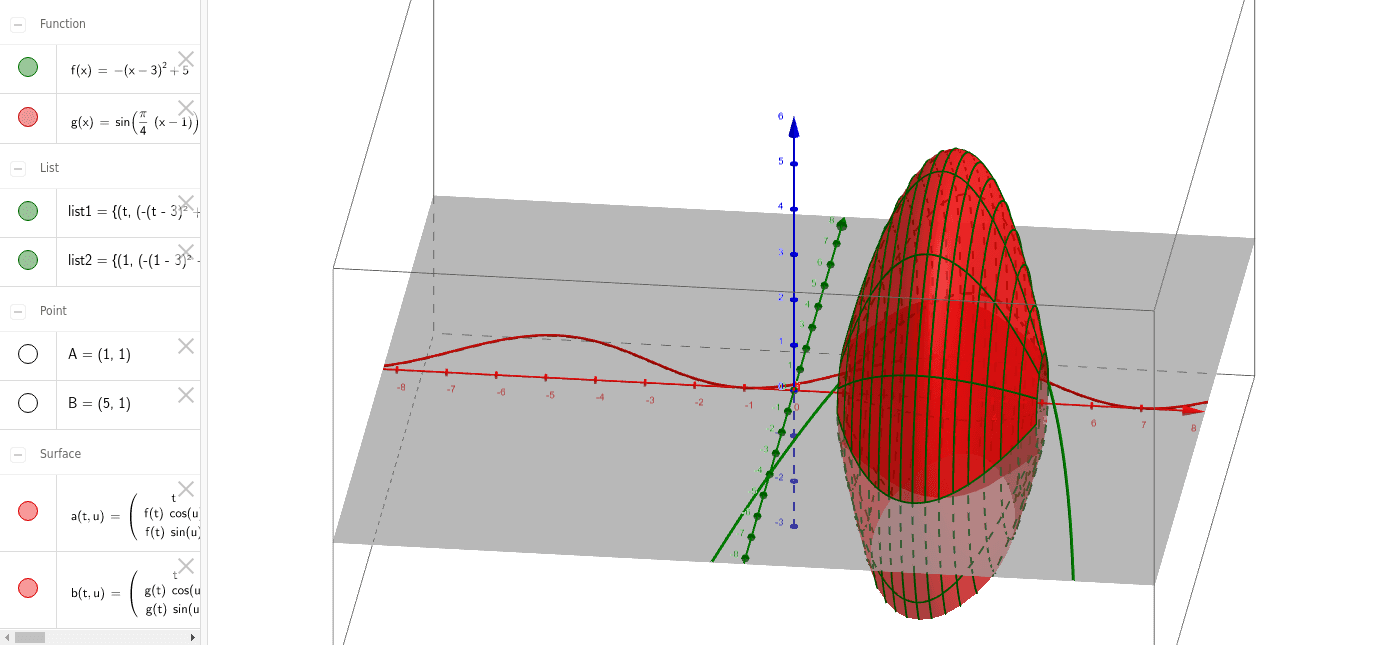
This example demonstrates the surface area of a solid formed by rotating the area between two functions around the x-axis. Key math concepts include integration, function graphs, and calculations of rotational solids' volume and surface area. GeoGebra commands and objects used in construction are Intersect, Surface, and Sequence, along with objects f, g, A, B, a, b, list1, list2. Suitable for high school students and above learning calculus, particularly rotational solids, and university foundational mathematics education.
GeoGebra Commands & Parameters
Intersect(f, g, (1, 1)) → AIntersect(f, g, 4, 7) → BSurface(t, (f(t) * cos(u)), (f(t) * sin(u)), t, 1, 5, u, 0, 6.283185307179586) → aSurface(t, (g(t) * cos(u)), (g(t) * sin(u)), t, 1, 5, u, 0, 6.283185307179586) → bSequence(CurveCartesian[t, (f(t) * cos(u)), (f(t) * sin(u)), t, 1, 5], u, 0, 6.28319, 0.5236) → list1Sequence(CurveCartesian[t, (f(t) * cos(u)), (f(t) * sin(u)), u, 0, 6.28319], t, 1, 5, 0.25) → list2