
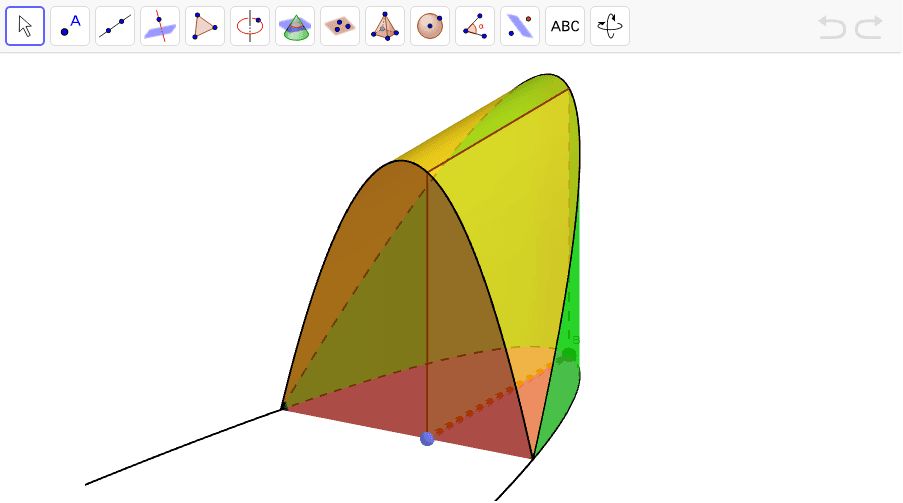
Square Cross Section: Finished Product
Loading the math board and drawing, please wait…
In collections
Square Cross Sections
This example demonstrates the process of generating a 3D shape by applying a square cross-section through geometric translation to a cone. Core math concepts include square, translation, cone, isosceles triangles, real numbers, and geometric transformations. Construction highlights the use of GeoGebra commands/objects like Root, Segment, Point, Polygon, CurveCartesian, and Surface as per the summary. Ideal for high school students and math enthusiasts exploring spatial geometry and transformation applications.
GeoGebra Commands & Parameters
Root(f) → R1, R2Segment(R1, R2) → aPoint(a) → ASegment(A, B) → bPolygon(A, B, (x(B), y(B), y(B)), (x(A), y(A), y(B))) → poly1, a_1, b_1, c, dCurveCartesian(t, 0, f(t), t, 1, 5) → eCurveCartesian(t, f(t), f(t), t, 1, 5) → gSurface(u + ((1 - u) * t), (u * 0) + ((1 - u) * 0), (u * 0) + ((1 - u) * f(t)), u, 0, 1, t, 1, 5) → hSurface((u * t) + ((1 - u) * t), (u * 0) + ((1 - u) * f(t)), (u * f(t)) + ((1 - u) * f(t)), u, 0, 1, t, 1, 5) → iSurface((u * t) + ((1 - u) * t), (u * f(t)) + ((1 - u) * f(t)), (u * 0) + ((1 - u) * f(t)), u, 0, 1, t, 1, 5) → jSurface((u * t) + ((1 - u) * t), (u * 0) + ((1 - u) * f(t)), (u * 0) + ((1 - u) * 0), u, 0, 1, t, 1, 5) → k
AI Drawing Prompt Reference
Create a 3D model of a cone, then display a solid formed by translating a square cross-section through the cone. Define a function f(t) representing the cone's lateral profile, find two root points R1 and R2 on the x-axis and connect them to form segment a. Take a point A on this segment and draw a vertical segment from A to form one side of a square. Using this square as a cross-section, translate it along the cone's axis to generate a series of parallel square trajectories, whose envelope forms the internal geometric body of the cone. Also draw the circular base of the cone (formed by projecting the curve onto the y=0 plane), the lateral profile curve (extending along f(t)), and three lateral surfaces of the cone (formed by the front-back, left-right, and top-bottom surfaces during the square's translation). The overall display shows the complete solid swept by the square cross-section moving through the cone.
The prompt above was compiled from the original drawing commands and is for reference only.