
Spherical Geometry Model of a Rectified Truncated Icosahedron: 90 Vertices
Loading the math board and drawing, please wait…
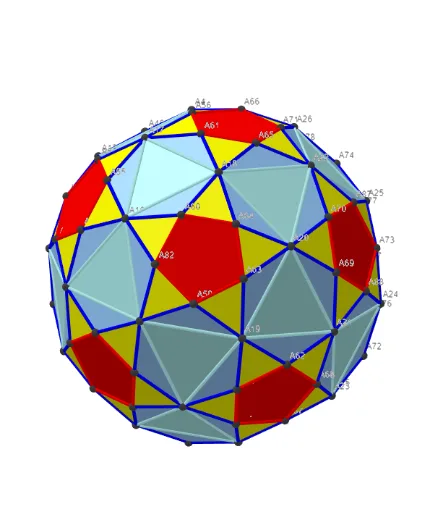
This example demonstrates how to construct and visualize a rectified truncated icosahedron using a dense set of discrete vertices, revealing its spatial polyhedral structure through points and connecting edges. Key mathematical ideas include polyhedron geometry, vertex/edge combinatorics, and the role of symmetry in solids derived from the icosahedron family; it also emphasizes building geometric relations via points and vectors. Construction highlights: GeoGebra’s Sphere is used to establish a spherical reference, while Sequence generates vertex lists; KeepIf filters points according to geometric constraints. Data handling is organized with Sum and Zip for aggregation and pairing, and Text/TableText provide labeling for vertices and computed entities. The construction centers on objects such as Points00 (vertex set) and Segments (edges/connection lines), along with auxiliary objects for vectors and annotations (e.g., lVector1–lVector3, txt_p, txtUm1, Cm). Suitable for advanced secondary students and university learners in solid geometry, STEM visualization, and geometry construction practice.
GeoGebra Commands & Parameters
UnicodeToLetter(34) → u34Text("" + Um1) → txt_pSum(Flatten[Sequence[Append[Sequence[Element[txt_p, i], i, m01(k), m02(k)], " "], k, 1, 5]]) → txtUm1Zip(Vector[a, a + UnitVector[a]], a, Points00) → lVector1Zip(Vector[a, a + (1.5 * UnitVector[b])], a, Points00, b, Wi_Pc) → lVector2Zip(Vector[a, a + (1.5 * UnitVector[b])], a, Points00, b, Wi_P) → lVector3Sphere((0, 0, 0), 5) → sphTableText(Append["i", 1…n], Append[" \fgcolor{orange}{GM :Δφ_i}, rad", l1w], Append["\fgcolor{magenta}{GC :Δφ_i} , rad", l1cw], "v") → text23rZip(Segment[Element[Points00, y(a)], Element[Points00, z(a)]], a, ll1bb(1)) → ll1Zip(Segment[Element[Points00, y(a)], Element[Points00, z(a)]], a, ll1bb(2)) → ll2Zip(Segment[Element[Points00, y(a)], Element[Points00, z(a)]], a, ll1bb(3)) → ll3Zip(Segment[Element[Points00, y(a)], Element[Points00, z(a)]], a, ll1bb(4)) → ll4Zip(Segment[Element[Points00, y(a)], Element[Points00, z(a)]], a, ll1bb(5)) → ll5Zip(Segment[Element[Points00, y(a)], Element[Points00, z(a)]], a, ll1bb(6)) → ll6Zip(Segment[Element[Points00, y(a)], Element[Points00, z(a)]], a, ll1bb(7)) → ll7Zip(Segment[Element[Points00, y(a)], Element[Points00, z(a)]], a, ll1bb(8)) → ll8Zip(Segment[Element[Points00, y(a)], Element[Points00, z(a)]], a, ll1bb(9)) → ll9Sequence(Polygon[Element[Points3D, Element[Element[mm1, f], 1]], Element[Points3D, Element[Element[mm1, f], 2]], Element[Points3D, Element[Element[mm1, f], 3]]], f, 1, Length[mm1]) → poly_{3}KeepIf(round((x * 10^(6))) / 10^(6) ≟ Element[poly_{3}S, 1], poly_{3}) → poly001KeepIf(round((x * 10^(6))) / 10^(6) ≟ Element[poly_{3}S, 2], poly_{3}) → poly002KeepIf(round((x * 10^(6))) / 10^(6) ≟ Element[poly_{3}S, 3], poly_{3}) → poly003Sequence(Polygon[Sequence[Points3D(m5(f, k)), k, 1, Length[m5(1)]]], f, 1, Length[m5]) → poly004
AI Drawing Prompt Reference
Create a 3D visualization on a spherical reference: place a large sphere centered at the origin, then generate a dense set of discrete points lying on the sphere to represent the vertex set of a rectified truncated icosahedron with 90 vertices. Connect selected pairs of these spherical points with line segments to form the polyhedral edges, using the point coordinates to define which vertices are linked. Build faces by taking triplets of the generated vertices and forming closed triangular polygons on the sphere, applying filtering so duplicate or repeated faces are removed and the face set becomes consistent. Add a few text labels for key entities (such as vertex/face identifiers) to emphasize the polyhedron’s symmetry and combinatorial structure.
The prompt above was compiled from the original drawing commands and is for reference only.