
Sphere Volume Calculator
Loading the math board and drawing, please wait…
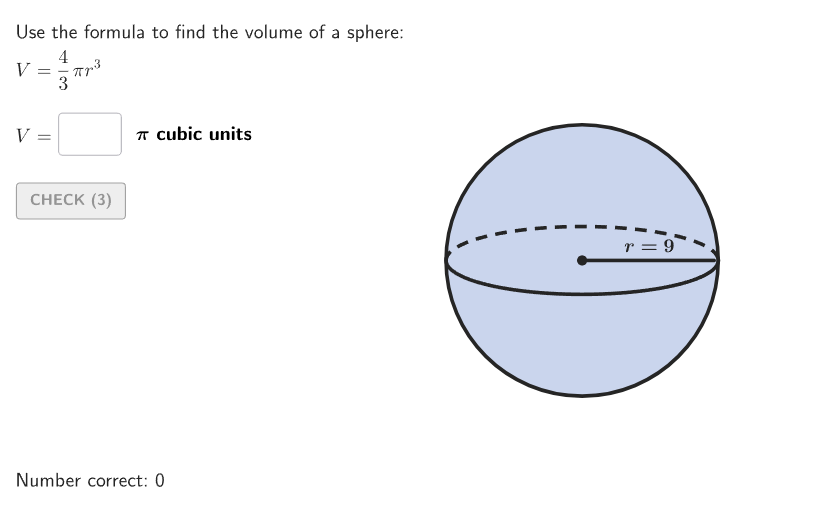
This interactive GeoGebra activity demonstrates how to calculate the volume of a sphere using the formula V=(4/3)πr³. It involves solid geometry concepts and volume computation. The construction uses Circle commands to draw the sphere outline, Segments for radius visualization, InputBoxes for radius input, If conditions for answer validation with Text feedback, and random number generation for practice problems. Designed for middle school students (grades 6-8) to practice solving sphere volume problems in both numerical and word problem formats.
GeoGebra Commands & Parameters
Shuffle(Sequence[20]) → randomList2, {9, 19, 7, 10, 12, 14, 3, 13, 11, 17, 18, 5, 20, 1, 8, 16, 6, 2, 4, 15}Shuffle(Sequence[10]) → randomList1, {3, 1, 5, 4, 6, 9, 8, 7, 2, 10}If(Element[randomList2, Mod[countQuestion, Length[randomList2]] + 1] ≤ 10, 1, 2) → randomNum2Textfield(input1) → InputBox1Textfield(input2) → InputBox2Polygon(Zip[PixelsToPoint[Corner[1], Corner[3], Corner[5], A], A, {(pixelsLeft, pixelsTop), (pixelsLeft, y(Corner[5]) - pixelsBottom), Corner[5] - (pixelsRight, pixelsBottom), (x(Corner[5]) - pixelsRight, pixelsTop)}]) → borderBoxCorner(5) → layoutAppSizeexpandSegment(A, B, (pulsing * 7), Corner[1], Corner[3], Corner[5]) → pulsingObjectonboardingTextOffset(Corner[onboardingText, 1], Corner[onboardingText, 3], onboardingCase, Corner[1], Corner[3], Corner[5]) → OnboardingTextOffsetElement({If[layoutX ≟ 16, layoutX - 5, 11], layoutX - 5}, layoutCase) → layoutHintSolnXCircle((0, 0), 1) → cCircle((0, 0), 1) → dSegment(C, (0.97, 0)) → hTranslate(hGL, Vector[(Vector[Corner[4], Corner[1]] / 500 * 24)]) → hGL'Translate((0.5, 0), Vector[(Vector[(0.5, 0), TargetPoint] * anim)]) → AnimPointText((("\phantom{r=}" * randomNum1) * "\\"), AnimPoint, true, true, 0, 1) → labelRadiusAnimText((("r=" * randomNum1) * "\\"), (0.5, 0.1), true, true, 0, 0) → labelRadiusSegment((0, 0), (-1, 0)) → iText(("d=" * (2 * randomNum1)), (0, 0), true, true, 0, -1) → labelDiam
AI Drawing Prompt Reference
Please draw a graphic to demonstrate the calculation of the volume of a sphere. The graphic should include a sphere outline drawn using circle commands. Next, include a radius visualization segment and a diameter marker. Also, add an input box for entering the radius value. Additionally, include an animated point to show changes in the radius. The construction order should be: first draw the sphere outline, then add the radius segment and diameter marker, followed by the input box and animated point, and finally add text labels to explain the elements.
The prompt above was compiled from the original drawing commands and is for reference only.