
Sphere Volume Calculation by Rasha Tarek
Loading the math board and drawing, please wait…
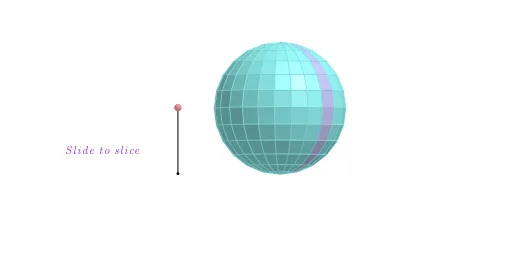
This example demonstrates the dynamic calculation of a sphere's volume, involving core math concepts like sphere volume formula, integral, and calculus. It utilizes commands such as Line, Sequence, Rotate, Segment, Point, If, Translate, Sphere, OrthogonalPlane, Mirror in GeoGebra for construction. Suitable for high school and above students learning solid geometry and calculus concepts.
GeoGebra Commands & Parameters
Line((0, 0, 1), (0, 1, 1)) → cSequence(Rotate[(0, 0, 0), ((-((i * 15))))°, c], i, 0, 6) → list1Rotate(list1, 15°, zAxis) → list1'Line(Element[list1, 2], Element[list1', 2]) → l1Line((0, 0, 0), l1) → l0Sequence(Polygon[Element[list1, i], Element[list1', i], Element[list1', i + 1], Element[list1, i + 1]], i, 1, 6) → list2Segment(A, A + (0, 0, 1)) → aPoint(a) → PIf(z(P) ≥ 0.5, 0, (2 * (0.5 - z(P)))) → tIf(z(P) ≥ 0.5, (2 * (1 - z(P))), 1) → sTranslate(list2, Vector[(s * Vector[(0, 0, 0), (1, 0, 0)])]) → list2'Translate(l0, Vector[(s * Vector[(0, 0, 0), (1, 0, 0)])]) → l0'Sphere((0, 0, 1), 1) → bSequence(Pyramid[Element[list2, i], (0, 0, 1)], i, 1, 6) → list3Translate(list3, Vector[(s * Vector[(0, 0, 0), (1, 0, 0)])]) → list3'Line(Element[list1, 3], Element[list1', 3]) → l2Line(Element[list1, 4], Element[list1', 4]) → l3Line(Element[list1, 5], Element[list1', 5]) → l4Line(Element[list1, 6], Element[list1', 6]) → l5Line(Element[list1, 7], Element[list1', 7]) → l6Rotate(Element[list3', 1], ((t * 7.5))°, l0') → dTranslate(l1, Vector[(s * Vector[(0, 0, 0), (1, 0, 0)])]) → l1'Translate(l2, Vector[(s * Vector[(0, 0, 0), (1, 0, 0)])]) → l2'Translate(l3, Vector[(s * Vector[(0, 0, 0), (1, 0, 0)])]) → l3'Translate(l4, Vector[(s * Vector[(0, 0, 0), (1, 0, 0)])]) → l4'Rotate(l1', (7.5° * t), l0') → l1''Rotate(Rotate[Element[list3', 2], ((t * 7.5))°, l0'], ((t * 15))°, l1'') → eRotate(Rotate[l2', ((t * 7.5))°, l0'], ((t * 15))°, l1'') → l2''Rotate(Rotate[Rotate[Element[list3', 3], ((t * 7.5))°, l0'], ((t * 15))°, l1''], ((t * 15))°, l2'') → fRotate(Rotate[Rotate[l3', ((t * 7.5))°, l0'], ((t * 15))°, l1''], ((t * 15))°, l2'') → l3''Rotate(Rotate[Rotate[Rotate[Element[list3', 4], ((t * 7.5))°, l0'], ((t * 15))°, l1''], ((t * 15))°, l2''], (15° * t), l3'') → gRotate(Rotate[Rotate[Rotate[l4', ((t * 7.5))°, l0'], ((t * 15))°, l1''], ((t * 15))°, l2''], ((t * 15))°, l3'') → l4''Rotate(Rotate[Rotate[Rotate[Rotate[Element[list3', 5], ((t * 7.5))°, l0'], ((t * 15))°, l1''], ((t * 15))°, l2''], (15° * t), l3''], (15° * t), l4'') → hTranslate(l5, Vector[(s * Vector[(0, 0, 0), (1, 0, 0)])]) → l5'Rotate(Rotate[Rotate[Rotate[Rotate[l5', ((t * 7.5))°, l0'], ((t * 15))°, l1''], ((t * 15))°, l2''], ((t * 15))°, l3''], (15° * t), l4'') → l5''Rotate(Element[list2', 1], ((t * 7.5))°, l0') → poly1Rotate(Rotate[Rotate[Rotate[Rotate[Rotate[Element[list3', 6], ((t * 7.5))°, l0'], ((t * 15))°, l1''], ((t * 15))°, l2''], (15° * t), l3''], (15° * t), l4''], (15° * t), l5'') → iRotate(Rotate[Element[list2', 2], ((t * 7.5))°, l0'], ((t * 15))°, l1'') → poly2Rotate(Rotate[Rotate[Element[list2', 3], ((t * 7.5))°, l0'], ((t * 15))°, l1''], ((t * 15))°, l2'') → poly3Rotate(Rotate[Rotate[Rotate[Element[list2', 4], ((t * 7.5))°, l0'], ((t * 15))°, l1''], ((t * 15))°, l2''], (15° * t), l3'') → poly4Rotate(Rotate[Rotate[Rotate[Rotate[Element[list2', 5], ((t * 7.5))°, l0'], ((t * 15))°, l1''], ((t * 15))°, l2''], (15° * t), l3''], (15° * t), l4'') → poly5Rotate(Rotate[Rotate[Rotate[Rotate[Rotate[Element[list2', 6], ((t * 7.5))°, l0'], ((t * 15))°, l1''], ((t * 15))°, l2''], (15° * t), l3''], (15° * t), l4''], (15° * t), l5'') → poly6OrthogonalPlane((0, 0, 1), zAxis) → mTranslate(l6, Vector[(s * Vector[(0, 0, 0), (1, 0, 0)])]) → l6'Rotate(Rotate[Rotate[Rotate[Rotate[Rotate[l6', ((t * 7.5))°, l0'], ((t * 15))°, l1''], ((t * 15))°, l2''], ((t * 15))°, l3''], (15° * t), l4''], (15° * t), l5'') → l6''Rotate(Rotate[Rotate[Rotate[Rotate[Rotate[Rotate[m, ((t * 7.5))°, l0'], ((t * 15))°, l1''], ((t * 15))°, l2''], (15° * t), l3''], (15° * t), l4''], (15° * t), l5''], (7.5° * t), l6'') → nMirror(i, n) → i'Mirror(h, n) → h'Mirror(g, n) → g'Mirror(f, n) → f'Mirror(e, n) → e'Mirror(d, n) → d'Mirror(poly6, n) → poly6'Mirror(poly5, n) → poly5'Mirror(poly4, n) → poly4'Mirror(poly3, n) → poly3'Mirror(poly2, n) → poly2'Mirror(poly1, n) → poly1'Sequence(Rotate[list3, 15° + ((15° * 22) * i), zAxis], i, 0, 1) → list4Mirror(list4, m) → list4'Sequence(Rotate[list2, (15° * i), zAxis], i, 1, 23) → list5Mirror(list5, m) → list5'
AI Drawing Prompt Reference
Draw a sphere and demonstrate the calculation of its volume. Start by creating a vertical line, then rotate it to generate multiple points, connecting them to form sectors. Next, transform these sectors into pyramids based on the sphere's height variations, calculating the volume of each pyramid. Finally, stack these pyramids to form the sphere, labeling key points and lines to illustrate the volume calculation process.
The prompt above was compiled from the original drawing commands and is for reference only.