
Special Right Triangles: 45-45-90
Loading the math board and drawing, please wait…
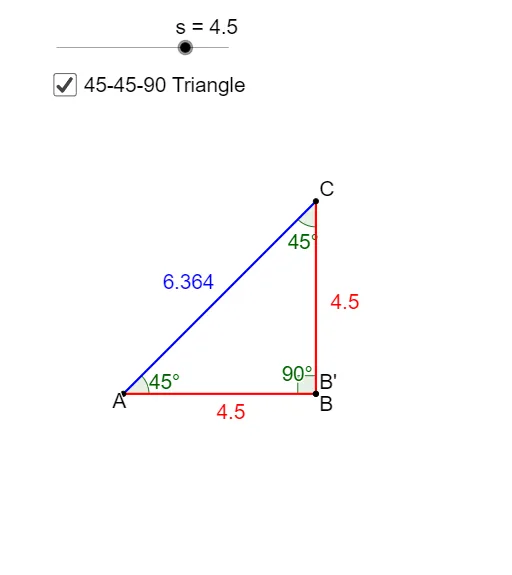
This example demonstrates the construction and properties of a 45-45-90 right triangle. Key mathematical concepts include isosceles right triangles, the Pythagorean theorem, and geometric construction. The construction involves GeoGebra commands such as Point, Segment, Rotate, Angle, etc. It is suitable for middle school or high school students to learn geometric foundations and understand the properties of special right triangles.
GeoGebra Commands & Parameters
Point(Circle[A, s]) → BSegment(A, B) → aRotate(A, 270°, B) → CRotate(B, 270°, B) → B'Segment(C, B') → a'Segment(A, C) → bAngle(C, B, A) → αAngle(B, A, C) → βAngle(A, C, B) → γPoint(Circle[X, s]) → YSegment(X, Y) → dRotate(Y, 60°, X) → Y'Angle(Y, X, Y') → δLine(X, Y') → eRotate(X, 270°, Y) → X'Angle(X', Y, X) → εLine(Y, X') → fIntersect(e, f) → ZSegment(Y, Z) → gSegment(X, Z) → hAngle(X, Z, Y) → ζ
AI Drawing Prompt Reference
Draw a 45-45-90 right triangle to demonstrate its construction and properties. Start by creating an isosceles right triangle, then rotate one of its legs to form another congruent triangle. Next, draw a circle centered at one vertex and construct an inscribed equilateral triangle, highlighting its sides and angles. Finally, rotate and intersect lines to show the relationship between the equilateral triangle and the original triangle, labeling key angles and sides.
The prompt above was compiled from the original drawing commands and is for reference only.