
Spaceship Racing Game
Loading the math board and drawing, please wait…
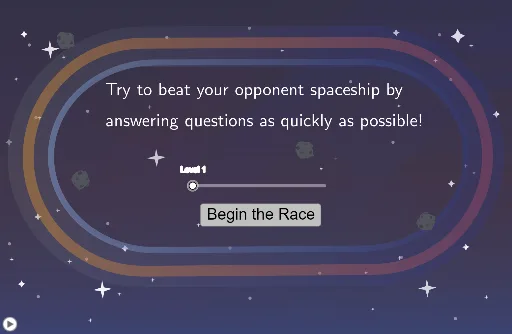
This example demonstrates an interactive spaceship racing game integrated with mathematical concepts. It involves core math ideas like integer operations, probability & statistics (random experiments, median value, percentages), linear functions, and plane figures. Construction highlights include commands like Intersect, Point, Segment, Semicircle, RandomElement, and Sequence, making it suitable for middle school and above students for visualizing and learning math through gamification.
GeoGebra Commands & Parameters
Intersect(xAxis, yAxis) → APoint(xAxis) → BSegment(A, B) → fPoint(yAxis) → CSegment(C, D) → gSemicircle(D, B) → cSemicircle(A, C) → dLaTeX(Text[RandNum1]) → DisplayRandNum1LaTeX(Text[RandNum2]) → DisplayRandNum2LaTeX(Text[RandAns]) → DisplayRandAnsRandomElement(ListOfSymbols) → DiceRollText("test") → DisplaySymbolLaTeX(Text[RandAnsFake1]) → DisplayRandAnsFake1LaTeX(Text[RandAnsFake2]) → DisplayRandAnsFake2RandomElement({1, 2, 3}) → FakeRoll1RandomElement({1, 2, 3}) → FakeRoll2Circle((0.5, 1.5), 0.6) → CircOutline1Circle((2, 1.5), 0.6) → CircOutline2Circle((3.5, 1.5), 0.6) → CircOutline3Shuffle(ListOfPoints) → ListOfPointsShuffledCircle(Point1, 0.6) → TouchArea1Circle(Point2, 0.6) → TouchArea2Circle(Point3, 0.6) → TouchArea3LaTeX(Text["Incorrect\ Answers: " + Incorrect]) → DisplayIncorrectSequence(Element[TimesList, 1 + i] - Element[TimesList, i], i, 1, Length[TimesList] - 1) → OldAverageSpeedListLaTeX(Text["Your\ Score: " + Score]) → DisplayScoreSegment((0, -0.25), (0, 0.45)) → startsegmentSegment((-2.35, 2), (-1.55, 2)) → endsegmentText("Finish") → EndTextLaTeX(Text["Try\ to\ beat\ your\ opponent\ spaceship\ by\\\ \\answering\ questions\ as\ quickly\ as\ possible!"]) → feedback
AI Drawing Prompt Reference
Draw a coordinate system with the x-axis and y-axis intersecting at the origin. Draw two points A and B on the x-axis and connect them to form line f. Draw two points C and D on the y-axis and connect them to form line g. Draw a semicircle c with diameter BD and a semicircle d with diameter AC. Draw a line segment startsegment from (0, -0.25) to (0, 0.45) on the x-axis, and draw two line segments and the text 'Finish' on the left side of the x-axis. Draw three circles near the y-axis to represent touch areas. Display random numbers and questions, as well as incorrect answers and score at the bottom of the screen.
The prompt above was compiled from the original drawing commands and is for reference only.