
Space Curve and TNB Frame
Loading the math board and drawing, please wait…
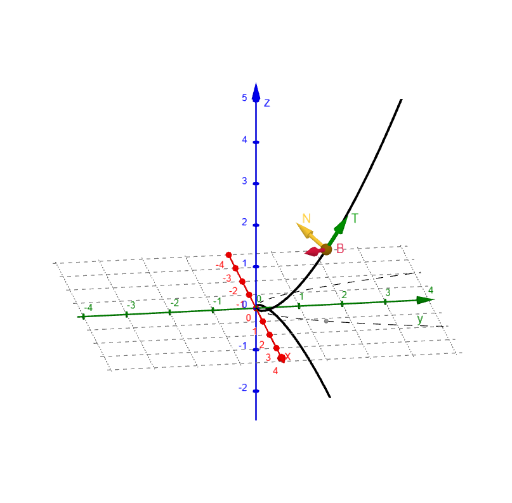
This example demonstrates the dynamic behavior of the TNB frame (Tangent, Normal, Binormal) for a space curve. It involves core math concepts like vectors, parametric equations, derivatives, and spatial geometry. Construction highlights include using CurveCartesian for plotting, Vector for creating vectors, Textfield for displaying text, Length for measurements, and InputBoxes for parameter inputs, with objects like Tz, Ty, Tx, N, κ. Suitable for high school students and above, particularly those studying calculus and spatial geometry.
GeoGebra Commands & Parameters
CurveCartesian(f(t), g(t), h(t), t, -10, 10) → cCurveCartesian(f(t), g(t), t, -10, 10) → cpVector(P) → rTextfield(f) → InputBox1Textfield(g) → InputBox2Textfield(h) → InputBox3Vector(P, P + (len * (Tx(t), Ty(t), Tz(t)))) → TLength(r'xr'') → mr'xr''
AI Drawing Prompt Reference
Draw a space curve with its tangent, normal, and binormal vectors forming the TNB frame, where the curve is defined by parametric equations, the tangent vector extends from a point on the curve along its direction, and the normal and binormal vectors are derived from the first and second derivatives of the tangent vector, displaying the curve, vectors, and related mathematical expressions and parameter input boxes.
The prompt above was compiled from the original drawing commands and is for reference only.