
Sorting Rational and Irrational Expressions
Loading the math board and drawing, please wait…
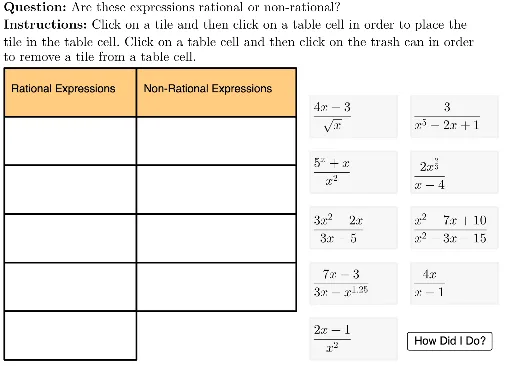
This example demonstrates how to classify rational and irrational expressions. Key mathematical concepts include rational and irrational numbers. Using a series of GeoGebra commands such as Sequence, Join, Shuffle, Zip, Element, and Text, the classification process is dynamically displayed. Suitable for students in middle school and above to learn about rational and irrational numbers.
GeoGebra Commands & Parameters
Sequence(Polygon[{tableAnchor + (col1Width + col2Width, 0 - (rowHeight * i)), tableAnchor + (col1Width + col2Width + col3Width, 0 - (rowHeight * i)), tableAnchor + (col1Width + col2Width + col3Width, 0 - (rowHeight * i) - rowHeight), tableAnchor + (col1Width + col2Width, ((-rowHeight) * i) - rowHeight)}], i, 0, lastRow - 2) → tableCol3Sequence(Polygon[{tableAnchor + (col1Width, 0 - (rowHeight * i)), tableAnchor + (col1Width + col2Width, 0 - (rowHeight * i)), tableAnchor + (col1Width + col2Width, 0 - (rowHeight * i) - rowHeight), tableAnchor + (col1Width, ((-rowHeight) * i) - rowHeight)}], i, 0, lastRow - 1) → tableCol2Join({Sequence[(13, i), i, 17, 17 - (4 * (tileHeight + 1)), (-tileHeight) - 1], Sequence[(13 + tileWidth + 1, i), i, 17, 17 - (3 * (tileHeight + 1)), (-tileHeight) - 1]}) → fixedFrameAnchorsShuffle(fixedFrameAnchors) → shuffledFrameAnchorsLaTeX(UnicodeToLetter[10003]) → cmarkLaTeX(UnicodeToLetter[10007]) → xmarkSequence(Polygon[{tableAnchor + (0, 0 - (rowHeight * i)), tableAnchor + (col1Width, 0 - (rowHeight * i)), tableAnchor + (col1Width, 0 - (rowHeight * i) - rowHeight), tableAnchor + (0, ((-rowHeight) * i) - rowHeight)}], i, 0, lastRow - 1) → tableCol1LaTeX((((("\text{" * QUESTION) * "\\") * INSTRUCTIONS) * "}")) → TEXTZip(Polygon[A, A + (tileWidth, 0), A + (tileWidth, (-tileHeight)), A + (0, (-tileHeight))], A, shuffledFrameAnchors) → framesElement(frames, 1) → frame1Element(frames, 2) → frame2Element(frames, 3) → frame3Element(frames, 4) → frame4Element(frames, 5) → frame5Element(frames, 6) → frame6Element(frames, 7) → frame7Element(frames, 8) → frame8Element(frames, 9) → frame9Element(cells, 1) → cell1Element(frames, activeTile) → highlightedTileElement(cells, 2) → cell2Element(cells, 3) → cell3Element(cells, 4) → cell4Element(cells, 5) → cell5Element(cells, 7) → cell7Element(cells, 8) → cell8Element(cells, 9) → cell9Element(cells, activeCell) → highlightedCellElement(tableCol1, 1) → col1HeaderCellElement(tableCol2, 1) → col2HeaderCellElement(tableCol3, 1) → col3HeaderCellElement(cells, 6) → cell6Zip(A ≟ B ∨ A ≟ C ∨ A ≟ D ∨ A ≟ E ∨ A ≟ F, A, {4, 4, 4, 4, 4, 9, 9, 9, 9}, F, {5, 5, 5, 5, 5, 10, 10, 10, 10}, itemsInCells, B, {1, 1, 1, 1, 1, 6, 6, 6, 6}, C, {2, 2, 2, 2, 2, 7, 7, 7, 7}, D, {3, 3, 3, 3, 3, 8, 8, 8, 8}, E) → cellsCorrectZip(Text[If[A, cmark, ""], Vertex[B, 2] + symbolOffset], A, cellsCorrect, B, cells) → cmarkListZip(Text[If[¬A, xmark, ""], Vertex[B, 2] + symbolOffset], A, cellsCorrect, B, cells) → xmarkListText("", tableAnchor + (0.5, ((-rowHeight)) / 2)) → col1HeaderText("", tableAnchor + (0, (-rowHeight) - rowHeight / 3), true, true) → rowHeader1Text("", tableAnchor + (0, ((-rowHeight) * 2) - rowHeight / 3), true, true) → rowHeader2Text("", tableAnchor + (0, ((-rowHeight) * 3) - rowHeight / 3), true, true) → rowHeader3Text("Rational Expressions", tableAnchor + (0.5 + col1Width, ((-rowHeight)) / 2)) → col2HeaderText("Non-Rational Expressions", tableAnchor + (0.5 + col1Width + col2Width, ((-rowHeight)) / 2)) → col3HeaderLaTeX("\text{You correctly sorted all the expressions.}") → feedback
AI Drawing Prompt Reference
Create a table for classifying rational and irrational expressions. The table has three columns: the first column is titled 'Rational Expressions', the second column is titled 'Non-Rational Expressions'. There are three rows: the first row contains the column titles, the second and third rows contain expressions and their classification marks, which are checkmarks and crossmarks to indicate correct and incorrect classifications, respectively.
The prompt above was compiled from the original drawing commands and is for reference only.