
Sort Geometric Solids
Loading the math board and drawing, please wait…
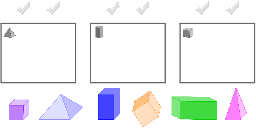
This example demonstrates sorting different geometric solids (cube, prism, pyramid) by dragging them into designated grey boxes. It involves core math concepts like solid geometry classification and shape recognition. GeoGebra commands used include Polygon, Corner, and Midpoint for constructing the solids and markings. Suitable for elementary and above geometry introduction or interactive online learning.
GeoGebra Commands & Parameters
Polygon(O_1, P_1, Q_1, R_1) → Vieleck1, o_1, p_1, q_1, r_1Polygon(S_1, T_1, U_1, V_1) → Vieleck2, s_1, t_1, u_1, v_1Polygon(W_1, Z_1, A_2, B_2) → Vieleck3, w_1, z_1, a_2, b_2Corner(pyramideBlau, 3) → EMidpoint(A, E) → FCorner(pyramidePink, 3) → K_2Midpoint(C, K_2) → L_2Corner(prismBlue, 3) → M_2Midpoint(G, M_2) → N_2Corner(prismGreen, 3) → O_2Midpoint(I, O_2) → P_2Corner(cubePurple, 3) → Q_2Midpoint(K, Q_2) → R_2Corner(cubeOrange, 3) → S_2Midpoint(I_2, S_2) → T_2