
Solving One-Step Equations by Adding or Subtracting
Loading the math board and drawing, please wait…
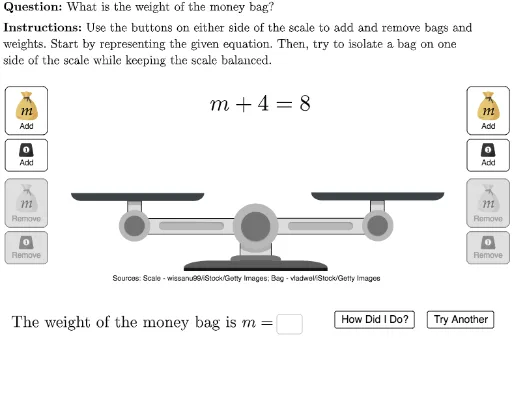
This example demonstrates solving one-step equations by adding or subtracting. The key mathematical concepts involve solving linear equations. Construction uses GeoGebra commands such as Random, UnicodeToLetter, Polygon, etc. Suitable for middle school students.
GeoGebra Commands & Parameters
Random(1, 4) → mUnicodeToLetter(10007) → xmarkUnicodeToLetter(10003) → cmarkRandom(1, 4) → leftOperandPolygon(A, leftScaleRegionCorner, C, D) → leftScaleRegion, a, b, c, dPolygon(I, rightScaleRegionCorner, K, L) → rightScaleRegion, i, j, k, lJoin({Sequence[C + ((-1.8 * i), 0), i, 1, Min[numWeightsLeft, 4]], Sequence[C + ((-1.8 * i), 1.5), i, 1, Min[numWeightsLeft - 4, 4]]}) → leftRegionWeightCornersJoin({Sequence[K + ((-1.8 * i), 0), i, 1, Min[numWeightsRight, 4]], Sequence[K + ((-1.8 * i), 1.5), i, 1, Min[numWeightsRight - 4, 4]]}) → rightRegionWeightCornersSequence(leftScaleRegionCorner + ((2 * i), 0), i, 0, Min[numBagsLeft, 1] - 1) → leftRegionBagCornersSequence(rightScaleRegionCorner + ((2 * i), 0), i, 0, Min[numBagsRight, 1] - 1) → rightRegionBagCornersLaTeX("\text{\textbf{Instructions: }Use the buttons on either side of the scale to add and remove bags and\\weights. Start by representing the given equation. Then, try to isolate a bag on one\\side of the scale while keeping the scale balanced.}") → SpecInstrucTextfield(answerText) → answerBoxLaTeX("\text{The weight of the money bag is }m=") → answerLineLaTeX("\text{\textbf{Question: }What is the weight of the money bag?}") → MainInstrucLaTeX("\text{Please enter the weight of the money bag.}") → remember
AI Drawing Prompt Reference
This is a graphic for solving a one-step equation, containing a text box for the equation, a label for the unknown, a label for the known, and a balanced representation. The construction order is to first create the text box and labels, then draw the balanced representation, and finally add explanatory text.
The prompt above was compiled from the original drawing commands and is for reference only.